Scaling WhatsApp Business API Webhooks: High-Throughput Architecture for Customer Support
Scaling WhatsApp Business API Webhooks: High-Throughput Architecture for Customer Support Updated for the 2026 WhatsApp Business Platform — On-Premises API retirement, per-message...
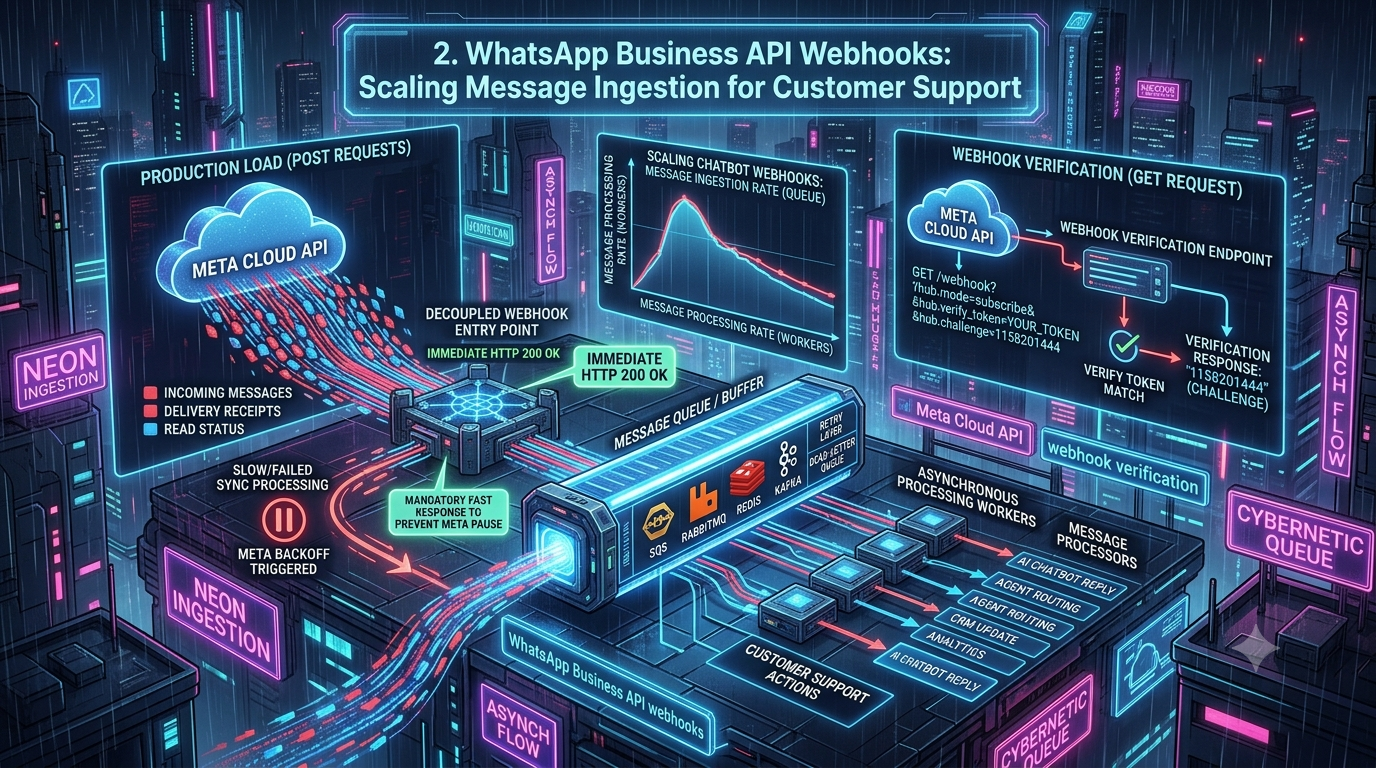
Scaling WhatsApp Business API Webhooks: High-Throughput Architecture for Customer Support
Updated for the 2026 WhatsApp Business Platform — On-Premises API retirement, per-message pricing, Business Portfolio messaging limits, and the new Meta Business Agent billing rollout.
Executive Summary
When operating customer support or marketing automation at scale, Meta's WhatsApp Cloud API serves as a high-velocity direct channel to users. Underneath every conversational AI, customer service platform, or transactional notification engine lies an event-driven foundation: WhatsApp Business API webhooks.
Meta pushes an HTTP POST request to your backend for every event on your WhatsApp Business Account (WABA), including:
- Inbound text messages, button clicks, and media attachments
- Outbound message delivery status updates (sent, delivered, read, failed)
- Message failure notices and error codes
- Quality rating shifts and message template status changes (e.g.,
APPROVEDorPAUSED) - Account, phone number, and Flows lifecycle events
During peak support hours or enterprise outbound marketing campaigns, webhook traffic spikes dramatically. As a rough illustration: a campaign sent to 100,000 customers, once you add sent/delivered/read callbacks on top of a wave of immediate replies, can easily generate several hundred thousand incoming webhook POST requests in a short window.
If your backend tries to process webhooks synchronously — writing to a database, calling an LLM, or syncing a CRM before responding — it will hit a wall. Meta's webhook infrastructure expects an HTTP 200 OK within roughly 5–10 seconds (the exact ceiling can vary by how you're connected to the platform). Miss that window or return a 5xx, and Meta treats the delivery as failed and retries with exponential backoff — for up to 7 days before giving up permanently. Sustained failures can also get your endpoint's subscription flagged.
This guide covers how to decouple webhook reception from message processing, implement Meta Cloud API webhook verification correctly, and build an asynchronous, fault-tolerant ingestion architecture capable of scaling to millions of events per day — plus what's changed on Meta's side through 2026 that affects how you should build this today.
1. Anatomy of the Meta Cloud API Webhook Protocol
There are two distinct phases to the webhook lifecycle: Verification (GET) and Event Ingestion (POST).
[ Meta Cloud API Server ]
             |
             |--- 1. GET /webhook (hub.mode, hub.verify_token, hub.challenge) ---> [ Ingestion API ]
             |<-- 2. HTTP 200 OK + hub.challenge body -----------------------------|  (Verification)
             |
             |--- 3. POST /webhook (HMAC X-Hub-Signature-256 + JSON Payload) ----> [ Ingestion API ]
             |<-- 4. Immediate HTTP 200 OK (< 50ms) -------------------------------|  (Ingestion)
Phase 1: Webhook Verification (GET)
When you register or update your Webhook URL in the Meta App Dashboard, Meta sends a GET request to confirm ownership, carrying three query parameters:
hub.mode: always the string"subscribe"hub.verify_token: a secret string you configured in the dashboardhub.challenge: a random string generated by Meta
Your endpoint must confirm hub.verify_token matches your secret and return the raw hub.challenge value as the response body with an HTTP 200. Note that Meta's endpoint requires a valid TLS/SSL certificate — self-signed certificates are rejected outright, so local testing typically needs a tunneling tool (ngrok, Cloudflare Tunnel) or a staging server with a real cert.
Phase 2: Event Notification Ingestion (POST)
Once verified, Meta forwards JSON payloads via POST. Every payload follows a uniform wrapper:
{
  "object": "whatsapp_business_account",
  "entry": [
    {
      "id": "YOUR_WHATSAPP_BUSINESS_ACCOUNT_ID",
      "changes": [
        {
          "value": {
            "messaging_product": "whatsapp",
            "metadata": {
              "display_phone_number": "15550001234",
              "phone_number_id": "999999999999999"
            },
            "contacts": [
              {
                "profile": { "name": "Jane Doe" },
                "wa_id": "15559998888"
              }
            ],
            "messages": [
              {
                "from": "15559998888",
                "id": "wamid.HBgLMTU1NTk5OTg4ODgVAgASGBQzQTEyMzQ1Njc4OUFCQ0RFRjAxMgA=",
                "timestamp": "1719876543",
                "text": { "body": "Where is my order #84920?" },
                "type": "text"
              }
            ]
          },
          "field": "messages"
        }
      ]
    }
  ]
}
Payload size cap: notification bodies can run up to 3 MB. Delivery guarantee: at-least-once, with no ordering guarantee — Meta's own guidance is to rely on the event timestamp, not arrival order.
Beyond messages, the platform now exposes several other subscribable fields worth wiring up in a mature integration: account_update (policy violations and restrictions), message_template_status_update, phone_number_quality_update, phone_number_name_update, business_capability_update (messaging-limit and tier changes), security, and flows (endpoint availability for WhatsApp Flows).
The Webhook Multiplier Effect
A common capacity-planning mistake is assuming incoming webhooks roughly equal outbound messages sent. In practice, each outbound message can generate up to three separate status callbacks (sent, delivered, read), on top of any inbound replies. As a back-of-envelope illustration:
A campaign of 50,000 promotional messages might produce something like:
| Event type | Approx. volume |
|---|---|
sent status updates | 50,000 |
delivered status updates | ~48,000 |
read status updates | ~25,000 |
| Immediate inbound replies | ~5,000 |
| Total incoming webhooks | ~128,000 POST requests |
These are illustrative ratios, not published Meta figures — actual delivered/read rates vary a lot by audience and template category. The point stands: if processing a single event involves a 300ms database write or a 2-second LLM call, doing that inline with the HTTP request will stall your ingestion tier long before you get anywhere near your real message volume.
2. Why Synchronous Ingestion Fails Under Load
Synchronous handling is the primary anti-pattern here. In a naïve architecture, an incoming POST flows through several blocking steps before Meta gets its response:
[ POST /webhook ] ➔ [ Signature Check ] ➔ [ DB Lookup ] ➔ [ OpenAI API / CRM ] ➔ [ Save State ] ➔ [ Return 200 OK ]
SYNCHRONOUS VS. DECOUPLED INGESTION LATENCY

Synchronous:
[ Meta POST ] ───► [ Validate ] ───► [ DB Write ] ───► [ LLM Call (2s) ] ───► [ HTTP 200 OK ] (TIMEOUT > 5s)
                                                                                  ▲
                                                                  Meta retries request / drops connection

Decoupled:
[ Meta POST ] ───► [ Quick Validate ] ───► [ Push to Buffer/Queue ] ───► [ HTTP 200 OK ] (< 20ms)
                                                       │
                                                       └───► (Async Worker Pool Processes Event)
1. Connection Pool Exhaustion
During a campaign, hundreds of concurrent webhooks can arrive per second. If each thread or process holds a connection open while waiting on external services, your web server rapidly exhausts its thread pool, memory, or database connections.
2. Retry Storms
If your handler takes longer than Meta's timeout, the delivery is marked failed and queued for exponential backoff retry for up to 7 days. While your server is already struggling under a live burst, it now also receives redeliveries of older, unacknowledged webhooks on top of that — a retry storm. There is no built-in dead-letter queue on Meta's side: if delivery keeps failing past the 7-day window, the event is dropped permanently with no way to replay it from Meta.
3. Out-of-Order Execution
Because Meta doesn't guarantee delivery order, a read status can legitimately arrive before its corresponding delivered status, or an older retried event can arrive after a newer one. A naïve UPDATE messages SET status = payload.status will happily let stale data clobber newer state.
4. Silent Subscription Failures (a newer, easy-to-miss gotcha)
Following changes to Meta's App Dashboard UI, it's become possible to have your webhook URL fully verified and your app's test button working, while your app is never actually subscribed to receive live events from the WABA. In the current dashboard, creating an app and adding a phone number doesn't always automatically register the WABA-to-App subscription the way it used to. If webhooks mysteriously stop arriving from real users despite a green checkmark in the dashboard, check (and, if needed, explicitly re-register) your app's subscription via the Graph API's /{WABA_ID}/subscribed_apps endpoint rather than assuming the dashboard toggle is sufficient.
3. High-Throughput Decoupled Ingestion Architecture
To handle high volume safely, separate Ingestion (receiving and acknowledging events) from Execution (business logic, AI responses, persistence).
                                                  ┌─────────────────────────────┐
                                                  │       Redis Cluster         │
                                                  │ (Deduplication / Idempotency)│
                                                  └──────────────┬──────────────┘
                                                                 │ (Check wamid)
                                                                 ▼
┌──────────────┐     HTTP POST      ┌───────────────────────────────────────────┐
│              │ ─────────────────► │        Ingestion API Tier                  │
│  Meta Cloud  │                    │     (Node.js / Go Stateless Proxy)         │
│  API Engine  │ ◄───────────────── │  1. Verify HMAC Signature (SHA-256)        │
│              │    HTTP 200 OK     │  2. Push Raw Event to Ingestion Queue      │
└──────────────┘     (< 30ms)       └─────────────────────┬─────────────────────┘
                                                          │
                                                          │ (Async Produce Event)
                                                          ▼
                                            ┌───────────────────────────┐
                                            │   Message Buffer / Queue  │
                                            │  (Kafka / Redis Streams / │
                                            │          AWS SQS)         │
                                            └─────────────┬─────────────┘
                                                          │
                                                          │ (Consume Batch)
                                                          ▼
                                            ┌───────────────────────────┐
                                            │    Async Worker Pool      │
                                            │  - Agent Routing          │
                                            │  - RAG / LLM Orchestration│
                                            │  - DB Persist (PostgreSQL)│
                                            └───────────────────────────┘
Architectural Principles
- Sub-50ms fast ACK. The Ingestion API should do the minimum: HMAC validation, a format sanity check, enqueue, and an immediate 200 OK.
- Durable buffering. Put an async broker (Redis Streams, Kafka, SQS, RabbitMQ) directly behind the Ingestion API to absorb bursts. As a rule of thumb, size your ingestion capacity for roughly 3x your outgoing message traffic plus 1x your expected incoming traffic — status callbacks routinely dwarf the message volume that triggered them.
- Idempotency at the edge. Use the unique WhatsApp Message ID (
wamid) to drop duplicates before they reach business logic — duplicates are a normal condition under at-least-once delivery, not an edge case. - Monotonic state reconciliation. Process status updates by the event's
timestampfield, not by arrival order, and only allow forward transitions (sent→delivered→read).
4. Step-by-Step Implementation Guide
Below is an implementation using Node.js, TypeScript, Express, and Redis for high-performance ingestion.
Step 1: Secure Signature Verification Middleware
Meta signs every POST using HMAC SHA-256 with your Meta App Secret, in the X-Hub-Signature-256 header (format: sha256=<hex digest>). Verify against the raw request body — before any JSON-parsing middleware transforms it — and be aware Meta uses escaped-Unicode encoding for special characters when computing the signature, which can bite you if your body-parsing pipeline normalizes encoding before you capture the raw bytes.
// middleware/cryptoVerification.ts
import { Request, Response, NextFunction } from 'express';
import crypto from 'crypto';

export interface AuthenticatedRequest extends Request {
  rawBody?: Buffer;
}

/**
 * Middleware to capture raw body buffer for HMAC verification.
 * Ensure Express JSON parser populates req.rawBody!
 */
export const verifyMetaSignature = (appSecret: string) => {
  return (req: AuthenticatedRequest, res: Response, next: NextFunction): void => {
    const signatureHeader = req.headers['x-hub-signature-256'] as string;

    if (!signatureHeader) {
      res.status(401).json({ error: 'Missing X-Hub-Signature-256 header' });
      return;
    }

    const [algorithm, signature] = signatureHeader.split('=');
    if (algorithm !== 'sha256' || !signature) {
      res.status(400).json({ error: 'Malformed signature header format' });
      return;
    }

    if (!req.rawBody) {
      res.status(500).json({ error: 'Raw body parsing omitted in middleware setup' });
      return;
    }

    // Compute expected HMAC SHA-256 hash using the raw Buffer
    const expectedSignature = crypto
      .createHmac('sha256', appSecret)
      .update(req.rawBody)
      .digest('hex');

    // Use timingSafeEqual to prevent timing side-channel attacks
    const signatureBuffer = Buffer.from(signature, 'utf8');
    const expectedBuffer = Buffer.from(expectedSignature, 'utf8');

    if (
      signatureBuffer.length !== expectedBuffer.length ||
      !crypto.timingSafeEqual(signatureBuffer, expectedBuffer)
    ) {
      res.status(403).json({ error: 'Invalid HMAC signature verification failed' });
      return;
    }

    next();
  };
};
Extra hardening: the Cloud API now also supports mutual TLS (mTLS) for webhook delivery, letting you additionally verify Meta's client certificate at the transport layer. If you operate in a regulated environment, layering mTLS on top of HMAC verification is worth the setup cost. You can also fetch Meta's current webhook-server IP ranges (via a
whoislookup against their published AS number) if you want a network-level allowlist as a third layer of defense — treat it as defense-in-depth, not a replacement for signature verification, since ranges can change.
Step 2: Meta Webhook Endpoint Controller
A single controller handling both GET (verification) and POST (high-speed ingestion):
// controllers/webhookController.ts
import { Response } from 'express';
import { AuthenticatedRequest } from '../middleware/cryptoVerification';
import { Redis } from 'ioredis';

const redis = new Redis(process.env.REDIS_URL || 'redis://localhost:6379');
const VERIFY_TOKEN = process.env.META_WEBHOOK_VERIFY_TOKEN || 'my_super_secure_token';

/**
 * Handles Meta Cloud API Webhook Verification (GET Request)
 */
export const verifyWebhook = (req: AuthenticatedRequest, res: Response): void => {
  const mode = req.query['hub.mode'];
  const token = req.query['hub.verify_token'];
  const challenge = req.query['hub.challenge'];

  if (mode === 'subscribe' && token === VERIFY_TOKEN) {
    console.log('[Webhook Verification] Successfully verified Meta Webhook.');
    res.status(200).send(challenge);
  } else {
    console.warn('[Webhook Verification] Verification failed. Token mismatch.');
    res.sendStatus(403);
  }
};

/**
 * Handles Inbound Webhook Event Notifications (POST Request)
 * Target SLA: Respond HTTP 200 OK in under 30ms.
 */
export const ingestWebhookPayload = async (
  req: AuthenticatedRequest,
  res: Response
): Promise<void> => {
  try {
    const payload = req.body;

    if (payload.object !== 'whatsapp_business_account') {
      res.sendStatus(404);
      return;
    }

    // Fast-path ACK: Return HTTP 200 immediately to release Meta's HTTP connection
    res.status(200).send('EVENT_RECEIVED');

    // Asynchronously push raw event data onto an ingestion stream/queue
    // We do NOT await complex downstream processing here!
    const streamPayload = JSON.stringify(payload);
    await redis.xadd('whatsapp_events_stream', '*', 'payload', streamPayload);

  } catch (error) {
    // If our ingestion tier itself suffers infrastructure failure (e.g. Redis connection down),
    // returning 500 signals Meta to queue and retry this message later.
    console.error('[Ingestion Error] Failed to push webhook to queue:', error);
    if (!res.headersSent) {
      res.status(500).send('Ingestion Buffer Failure');
    }
  }
};
Step 3: Asynchronous Consumer with Idempotency & Deduplication
A worker pool processes events off the stream. Every event must be handled idempotently by its wamid.
// workers/eventProcessorWorker.ts
import { Redis } from 'ioredis';

const redis = new Redis(process.env.REDIS_URL || 'redis://localhost:6379');
const DEDUPLICATION_TTL_SECONDS = 86400 * 2; // Keep wamid cache for 48 hours

interface WhatsAppMessage {
  id: string; // wamid
  from: string;
  timestamp: string;
  type: string;
  text?: { body: string };
}

interface WhatsAppStatus {
  id: string; // wamid
  status: 'sent' | 'delivered' | 'read' | 'failed';
  timestamp: string;
  recipient_id: string;
}

/**
 * Core Async Consumer Loop
 */
export async function startWorkerConsumer() {
  console.log('[Worker Started] Listening for WhatsApp webhook events...');

  while (true) {
    try {
      // Read batch from Redis Stream (blocking read for up to 2 seconds)
      const streams = await redis.xread('BLOCK', 2000, 'STREAMS', 'whatsapp_events_stream', '$');

      if (!streams) continue;

      for (const [streamName, entries] of streams) {
        for (const [id, fields] of entries) {
          const rawPayload = fields[1];
          const payload = JSON.parse(rawPayload);

          await processParsedPayload(payload);
        }
      }
    } catch (err) {
      console.error('[Worker Stream Read Error]:', err);
    }
  }
}

async function processParsedPayload(payload: any) {
  const entries = payload.entry || [];
  for (const entry of entries) {
    const changes = entry.changes || [];
    for (const change of changes) {
      const value = change.value;
      if (!value) continue;

      // 1. Process Incoming User Messages
      if (value.messages && value.messages.length > 0) {
        for (const message of value.messages as WhatsAppMessage[]) {
          await handleIncomingMessage(message, value.contacts);
        }
      }

      // 2. Process Delivery/Read Status Updates
      if (value.statuses && value.statuses.length > 0) {
        for (const status of value.statuses as WhatsAppStatus[]) {
          await handleStatusUpdate(status);
        }
      }
    }
  }
}

/**
 * Idempotent Incoming Message Handler
 */
async function handleIncomingMessage(msg: WhatsAppMessage, contacts: any[]) {
  const wamid = msg.id;
  const dedupKey = `dedup:msg:${wamid}`;

  // Atomic set-if-not-exists (NX) with expiration time (EX)
  const isNew = await redis.set(dedupKey, '1', 'EX', DEDUPLICATION_TTL_SECONDS, 'NX');

  if (!isNew) {
    console.log(`[Deduplicated] Skipping already processed message wamid: ${wamid}`);
    return;
  }

  console.log(`[Processing Message] From: ${msg.from} | ID: ${wamid} | Text: ${msg.text?.body}`);

  // EXECUTE HEAVY BUSINESS LOGIC HERE:
  // - Persist message to database (PostgreSQL/MongoDB)
  // - Trigger RAG / Vector DB query / LLM generation
  // - Route to active Human Agent inbox (e.g., Salesforce, Zendesk)
}

/**
 * Idempotent Status Update Handler with Timestamp Guard
 */
async function handleStatusUpdate(status: WhatsAppStatus) {
  const { id: wamid, status: newStatus, timestamp } = status;
  const statusKey = `status:state:${wamid}`;
  const incomingTimestamp = parseInt(timestamp, 10);

  // Status priority ladder to prevent out-of-order state regression
  const statusWeights = { sent: 1, delivered: 2, read: 3, failed: 4 };

  const currentData = await redis.hgetall(statusKey);

  if (currentData && currentData.weight) {
    const currentWeight = parseInt(currentData.weight, 10);
    const currentTimestamp = parseInt(currentData.timestamp, 10);

    // If incoming event is older than our stored state, discard it
    if (incomingTimestamp < currentTimestamp) {
      console.warn(`[Out-Of-Order Event] Ignored stale status ${newStatus} for ${wamid}`);
      return;
    }

    // Ignore state regressions (e.g. 'delivered' arriving after 'read')
    if (statusWeights[newStatus] <= currentWeight) {
      return;
    }
  }

  // Update Redis status state cache
  await redis.hmset(statusKey, {
    status: newStatus,
    weight: statusWeights[newStatus],
    timestamp: incomingTimestamp,
  });

  console.log(`[Status Updated] Message ${wamid} updated to status: ${newStatus}`);

  // Persist updated delivery status to database...
}
5. High-Volume Production Resilience Patterns
                     PRODUCTION BUFFER & RATE LIMITING PIPELINE

Incoming    ┌───────────────────┐    Enqueues    ┌───────────────────┐
Webhooks    │ Webhook Receiver  │ ─────────────► │ Async Event Queue │
----------> │   (Fast ACK 200)  │                │  (Kafka/Redis)    │
            └───────────────────┘                └─────────┬─────────┘
                                                           │
                                                           │ Controlled Fetch Rate
                                                           ▼
                                                 ┌───────────────────┐
                                                 │ Async Worker Pool │
                                                 └─────────┬─────────┘
                                                           │
                                                           │ Respects MPS + pair-rate limits
                                                           ▼
                                                 ┌───────────────────┐
                                                 │ Meta Outbound API │
                                                 └───────────────────┘
1. Handle Out-of-Order Delivery Gracefully
Never blindly UPDATE messages SET status = payload.status. Implement a monotonic state machine that only transitions forward (sent → delivered → read), and always order by the event's timestamp, not arrival time. If a read event arrives before delivered, you can safely infer delivered already happened.
2. Respect Meta's Outbound Throughput Limits
Meta enforces per-phone-number throughput tiers starting at 80 messages per second (MPS), upgradeable to 1,000 MPS. There's also a separate, easy-to-miss per-recipient "pair rate limit" of roughly one message every six seconds to the same user. Exceeding throughput returns error code 130429 (rate limit hit). Decouple ingestion from outbound sending so your worker pool can apply a token-bucket or leaky-bucket algorithm and stay safely under both limits.
3. Messaging limits now apply at the Business Portfolio level
Since October 2025, Meta evaluates business-initiated messaging limits (the daily cap on unique customers you can message with templates) at the Business Portfolio level rather than per phone number — all numbers in the same portfolio share one pool, and adding a new number no longer resets or adds capacity. Tier-upgrade eligibility is also now re-checked roughly every 6 hours instead of the old 24–48 hour cycle. This is worth wiring into your webhook consumer: subscribe to business_capability_update so you find out about limit changes the moment Meta pushes them, rather than discovering a new cap only after sends start failing.
One subtle detail for anyone parsing this field: the JSON key it reports the new limit under changed with the API version — older webhooks (API v23.0 and earlier) reported max_daily_conversation_per_phone, while current versions (v24.0+) report max_daily_conversations_per_business. If your consumer still keys off the old field name, it will silently stop picking up limit changes.
4. Error Code Handling Matrix
| HTTP Response Code | Meta's Interpretation | Action Taken by Meta | Correct System Use Case |
|---|---|---|---|
| 200 OK | Event delivered successfully | Marked complete; no retries | Ingestion API verified the signature and queued the event |
| 4xx (e.g. 400) | Client-side error | Meta retries delivery (backoff, up to 7 days) | Avoid returning 4xx for valid-but-unwanted payloads — log internally and ACK with 200 to prevent pointless retries |
| 403 Forbidden | Authorization failure | Drops/fails verification | Verify-token or HMAC mismatch |
| 5xx | Server-side infrastructure error | Queues for exponential backoff (up to 7 days), then drops permanently | Your queue/buffer (e.g. Redis cluster) is genuinely unreachable |
6. What's Changed on Meta's Side Through 2026
If you built your integration a year or two ago, several platform-level shifts materially affect how you should design and monitor webhook ingestion today.
- The On-Premises API is gone. Meta deprecated the legacy on-premises WhatsApp Business API in October 2025. The Cloud API (what this guide covers) is now the only supported path — if you're still running an on-prem client, migration is no longer optional.
- Pricing moved from per-conversation to per-message. As of July 1, 2025, Meta bills per delivered template message (by category and recipient country) instead of once per 24-hour conversation window. This changes what the pricing metadata inside your
statuseswebhook payloads actually represents, so any billing-reconciliation logic built against the old conversation model needs a second look. - Two more pricing changes are landing in the second half of 2026. From August 1, 2026, replies generated by Meta's own "Meta Business Agent" AI are billed per token (around $2 per million tokens, roughly 4–5 cents per typical reply) rather than per message. From October 1, 2026, plain "service messages" — free-form replies sent by a human agent or a third-party AI inside the 24-hour customer service window — become billable again for the first time since late 2024, at the same per-message rate as utility/authentication templates in that market. If your bot or support desk leans heavily on free-form replies to keep costs down, budget for this before October.
- Webhook event fields have grown. Beyond
messages, production integrations should also subscribe toaccount_update,phone_number_quality_update,phone_number_name_update,business_capability_update,security, andflowsto get full visibility into account health, not just message traffic. - Watch for silent WABA subscription gaps. As noted in Section 2, dashboard changes have made it possible for a webhook URL to look fully configured while the underlying app-to-WABA event subscription silently fails to register. Add a startup or health-check step that confirms the subscription via
/{WABA_ID}/subscribed_apps. - Graph API versions expire quietly. Meta ships new Graph API versions several times a year (v25.0 was the latest as of early 2026); once a version ages out, calls to it don't error — they silently fall back to the next usable version, which can change response shapes without warning. Pin an explicit version in your API calls and track Meta's changelog rather than relying on the dashboard's default "Upgrade API Version" setting.
- mTLS is available for webhook delivery. For teams that need transport-layer assurance beyond HMAC verification, the Cloud API supports mutual TLS on the webhook connection as an additional (not a replacement) layer of security.
None of this changes the core architectural advice in this guide — acknowledge fast, queue, process idempotently, reconcile monotonically — but it does change what you should be monitoring and where the sharp edges are likely to show up next.
7. Architectural Benchmarks & Metrics Checklist
+-----------------------------------------------------------------------+
|                       WEBHOOK HEALTH DASHBOARD                        |
+------------------------------------+----------------------------------+
| Ingestion Latency (p99)            | < 50 ms                          |
| ACK Success Rate                   | 99.99% HTTP 200 OK               |
| Queue Backpressure Lag             | < 500 total pending messages     |
| Idempotency Cache Hit Rate         | 5% to 15% (Detecting retries)    |
| Status State Out-of-Order Rejects  | < 0.1% of status events          |
+------------------------------------+----------------------------------+
Monitoring checklist:
- Queue backpressure alerting — page if ingestion-queue length grows continuously over a 2-minute window; that signals workers falling behind arrival rate.
- Log
fbtrace_id— every Meta webhook/error response includes anfbtrace_iddebug header. Log it alongsidewamidso Meta Developer Support can trace issues quickly. - Template status monitoring — subscribe to
message_template_status_updateso a quality-score drop that triggersPAUSEDorREJECTEDhalts automated campaigns before you rack up failed-send charges. - Build your own event log. Because Meta provides no dead-letter queue or replay capability, persist every raw payload to durable storage (S3, a database table) before processing, so you have a local replay source if a bug in your handler corrupts or drops events.
8. Conclusion & Architectural Summary
Synchronous message processing is still the primary cause of failure when handling Meta Cloud API webhooks at enterprise scale. When volume spikes, database contention and upstream latency trigger Meta's timeout window, which triggers retries, which pile onto an already-struggling server — a spiral that decoupled ingestion avoids entirely.
Key takeaways:
- Acknowledge immediately. Validate the HMAC signature, enqueue the raw payload, and return HTTP 200 in well under the 5–10 second window — ideally under 50ms.
- Verify cryptographically. Validate
X-Hub-Signature-256against the raw request buffer, using a timing-safe comparison. Consider mTLS as a second layer for regulated environments. - Handle events idempotently. Use
wamidand a fast cache (Redis) to drop redelivered duplicates — they are guaranteed to happen under at-least-once delivery. - Order statuses monotonically. Use event timestamps and a status-priority ladder to prevent out-of-order overwrites.
- Rate-limit outbound traffic. Respect both the per-number MPS tier and the per-recipient pair-rate limit to avoid error 130429.
- Track the moving parts on Meta's side. Portfolio-level messaging limits, the new per-token and per-message pricing changes rolling out through late 2026, and Graph API version expirations all show up first as a webhook event or a changed response shape — subscribe to the account-health fields, not just
messages.
A decoupled ingestion pipeline backed by an asynchronous queue, combined with active monitoring of the platform changes above, is what lets a WhatsApp integration keep working reliably as both your traffic and Meta's platform continue to evolve.