Scaling E-Commerce Integration: Managing Shopify Webhook Overload During Peak Sales Events
Scaling E-Commerce Integration: Managing Shopify Webhook Overload During Peak Sales Events The frontend of e-commerce has largely solved the "traffic spike" problem.
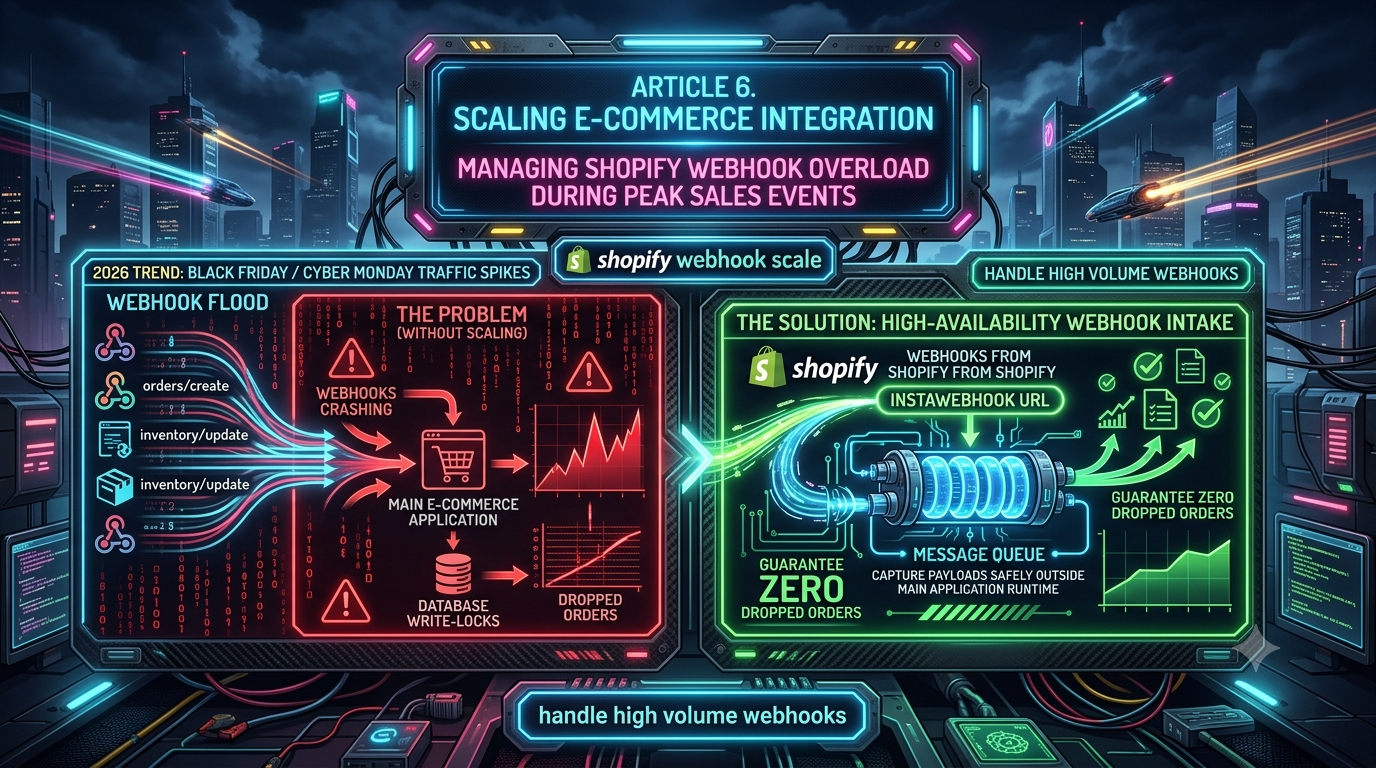
Scaling E-Commerce Integration: Managing Shopify Webhook Overload During Peak Sales Events
The frontend of e-commerce has largely solved the "traffic spike" problem. Edge computing, global CDNs, and headless architectures let a storefront absorb tens of thousands of concurrent visitors without breaking a sweat. The backend data-synchronization layer is a different story. When a flash sale or Black Friday/Cyber Monday (BFCM) event triggers a wave of transactions, the real bottleneck isn't serving pages — it's processing data.
For most merchants, the single biggest failure point during a peak sales event is an integration that can't keep up with high-volume webhooks. When thousands of orders/create and inventory_levels/update events fire in a short window, they can overwhelm internal APIs, exhaust database connection pools, and trigger write-lock pileups. This guide walks through why that happens, and the architecture that actually prevents it — with the specifics checked against Shopify's current developer documentation as of mid-2026.
How Shopify's Webhook Delivery Engine Actually Works
Shopify uses an "at-least-once" delivery model. When something happens on your store — a checkout completes, inventory changes — Shopify packages the event into a JSON payload and sends an HTTP POST to your registered endpoint. Three rules govern that delivery, and it's worth being precise about them, because a lot of the advice circulating online is out of date.
The 5-second window. Shopify waits five seconds for your server to return a response. This is strict and not configurable — it covers DNS lookup, TLS handshake, transfer, and your processing time combined.
Retries: 8 attempts over 4 hours. If your endpoint times out or returns anything other than a 2xx status, Shopify retries with exponential backoff. As of a September 2024 policy change, this is 8 retries spread across a 4-hour window — a meaningfully shorter and less forgiving schedule than the older "19 retries over 48 hours" figure that still circulates in a lot of blog posts and even some third-party vendor docs. If your reliability logic was written before late 2024, it's worth double-checking which number it assumes.
Subscription deletion. If a subscription created through the Admin API fails 8 consecutive times, Shopify automatically deletes it, and sends a warning to the app's emergency developer email beforehand. Once deleted, you get no further events on that topic until you manually re-register — a silent, total data gap, not a gradual degradation.
Worth flagging for anyone building against this in 2026: Shopify has also begun rolling out Events, a next-generation subscription mechanism that's currently in developer preview for a subset of topics and can run alongside classic webhooks in the same app config. It's not a replacement yet, but it's the direction Shopify's event delivery is heading, and it's worth keeping an eye on if you're planning integration work with a multi-year horizon.
Why Synchronous Processing Causes Database Write-Locks
Most custom integrations and ERP bridges start out synchronous:
- Shopify sends the webhook payload.
- Your router accepts the request.
- Your app parses the JSON, opens a database connection, and writes the data — inserting the order, updating customer lifetime value, decrementing inventory.
- Once the transaction commits, you return
200 OK.
Under normal load this takes 200–500ms. During a flash sale, it's a liability. If your store takes 5,000 orders in two minutes, your application is suddenly trying to open thousands of near-simultaneous database connections. Relational databases protect data integrity with row- and table-level locks, so when many requests try to decrement the same SKU's inventory count at once, they queue behind each other.
That queueing is the failure mode: the database slows down, connection pools (PgBouncer, RDS Proxy, etc.) hit their ceiling, and queries start timing out. Because the database hasn't responded, your application can't return 200 OK inside Shopify's 5-second window. Shopify marks the delivery failed and schedules a retry — while new orders are still coming in. That's a thundering-herd problem: fresh webhooks arriving on top of retries of the ones that just failed, which is exactly the condition that burns through Shopify's 8-attempt budget and triggers subscription deletion.
An Illustrative Scenario: The Flash Sale That Overwhelmed the Backend
To make this concrete, consider a composite scenario built from patterns commonly reported by merchants who've hit this wall (not a documented, named case study — the specifics below are illustrative, not sourced to a real company).
A mid-size streetwear brand runs a headless Shopify Plus storefront with a custom Node.js middleware syncing orders into a legacy warehouse management system. For a limited sneaker drop, they expect 15,000 orders in the first 10 minutes. The storefront holds up fine — customers check out without friction. The middleware doesn't:
- Minute 0–1: 1,500 orders land; Shopify fires 1,500
orders/createwebhooks. - Minute 2: The middleware tries to write all 1,500 payloads to Postgres. Lock contention on the
inventory_levelstable starts building. - Minute 3: Processing time balloons from ~300ms to 8+ seconds per request.
- Minute 4: Because that exceeds the 5-second window, Shopify marks a large batch of deliveries as failed and begins retrying.
- Minute 5+: New live orders arrive on top of retries. The server runs out of memory.
- ~Minute 30–45 (under the current 4-hour/8-attempt policy): Repeated failures exhaust the retry budget and the subscription is auto-deleted.
The result: the storefront shows thousands of completed sales, but the warehouse system only has a fraction of them. Someone spends the following days manually reconciling orders from CSV exports and Admin API pulls, while customers with "expedited shipping" wait on orders nobody fulfilled yet.
The lesson holds regardless of the exact numbers: ingestion and processing need to be architecturally separate.
The Fix: Respond First, Process Later
The main application should never be the thing Shopify's webhook dispatcher talks to directly. Instead, put a thin, highly-available ingestion layer in front of it — something whose only job is to acknowledge the delivery and hand the payload off, in milliseconds, to something durable.
That traffic flow looks like this:
- Edge reception — Shopify sends the webhook to your ingestion endpoint.
- Fast acknowledgment — the ingestion layer verifies the HMAC signature, drops the raw payload into a durable queue or event bus, and returns
200 OK— typically in well under 100ms, comfortably inside the 5-second limit. - Asynchronous consumption — your application (or a fleet of workers) pulls from that queue at whatever rate your database can actually sustain.
If your database can safely handle 50 writes per second, your workers simply pull 50 events per second from the queue regardless of how fast Shopify is sending them. A 5,000-event burst becomes a 100-second backlog instead of 5,000 failed deliveries — no write-lock storm, no timeout, no subscription deletion.
You have real, current options for building this layer, rather than one single "standard":
- Managed webhook gateways — services like Svix and Hookdeck are purpose-built for exactly this: signature verification, durable queuing, deduplication, and delivery visibility, without you operating the infrastructure. Newer, smaller entrants like InstaWebhook offer a similar durable-queue-plus-replay model and are worth evaluating alongside the more established players — but it's worth being clear-eyed that this is a competitive, fairly young product category rather than a single agreed-upon industry standard.
- DIY on cloud infrastructure — AWS API Gateway → SQS (or EventBridge), or Cloudflare Workers → Queues, give you the same "ingest, ack, queue" pattern if you'd rather own the stack.
- Message brokers — for larger, multi-consumer architectures, teams sometimes put Kafka or a similar broker behind the ingestion layer so multiple downstream systems (WMS, analytics, CRM) can each consume the same event stream independently.
Whichever route you pick, the point is the same: your database's write throughput should never be the thing standing between Shopify and a 200 OK.
Best Practices for Handling Shopify Webhooks at Scale
1. Build idempotent receivers
Because Shopify's model is "at-least-once," not "exactly-once," duplicate deliveries happen — for example, if a network hiccup means Shopify never saw your 200 OK even though you'd already processed the payload. Without deduplication you risk double-charging, duplicate shipments, or corrupted inventory counts.
Shopify's current documentation recommends deduplicating using the X-Shopify-Webhook-Id header, which stays the same across retries of the same delivery. (Older tutorials and some third-party docs reference an X-Shopify-Event-Id header for the same purpose — you'll still see both in the wild, but X-Shopify-Webhook-Id is what Shopify's current docs point to.) Don't use the order ID as your dedup key — a single order can trigger many separate webhook deliveries as it moves through fulfillment.
// Idempotency check using Shopify's current recommended header
const webhookId = req.headers['x-shopify-webhook-id'];

if (await redis.get(`processed_webhook:${webhookId}`)) {
  console.log(`Duplicate delivery ${webhookId} detected — skipping.`);
  return res.status(200).send('OK'); // Still acknowledge, to prevent further retries
}

// Mark as seen immediately, before heavy processing, to avoid race conditions
await redis.set(`processed_webhook:${webhookId}`, 'true', 'EX', 86400); // 24h TTL
2. Verify HMAC signatures at the edge
Every delivery includes an X-Shopify-Hmac-Sha256 header — a Base64-encoded HMAC of the payload, signed with your app's client secret. Verify it before trusting anything in the payload, and do the comparison in a timing-safe way to avoid side-channel timing attacks. If you're using a decoupled ingestion layer, this check should happen there, before the payload ever reaches your queue — otherwise a malicious actor could flood your queue (and your compute bill) with spoofed events.
3. Route failures to a dead-letter queue
Data errors happen even with a solid pipeline — a malformed address, an unexpected field after Shopify's API version rolls forward, a schema mismatch. Cap your consumer's retries (3–5 attempts is typical), and route anything that still fails to a dead-letter queue rather than letting it loop indefinitely. That keeps the main pipeline flowing and gives engineers a safe place to inspect, fix, and replay the problematic payloads.
4. Actively monitor subscription health
Because Shopify auto-deletes a subscription after 8 consecutive failures — which, during a peak event, can happen within an hour — you need visibility before it silently goes dark. Poll the Admin API's webhookSubscriptions GraphQL query on a schedule, and alert if an expected subscription is missing or degraded. If it is, re-register automatically rather than discovering the gap days later.
5. Don't rely on webhooks alone — reconcile
Shopify's own guidance is explicit that webhook delivery isn't guaranteed end-to-end, and recommends building periodic reconciliation jobs that pull from the Admin API (most list queries support an updated_at filter) to catch anything that slipped through — a stalled worker, a queue outage, an event that arrived out of order. Treat webhooks as your fast path, and reconciliation as your safety net, not the other way around.
The Bottom Line
Database write contention is the real ceiling on how much webhook volume your integration can absorb — you can't out-scale a row lock by adding more web server RAM. The fix is architectural: decouple the unpredictable, bursty world of Shopify's event delivery from the rigid, throughput-limited world of your database, using a queue in between.
Ingest instantly. Acknowledge immediately. Process asynchronously, at a rate your database can actually sustain. Get that separation right, verify signatures, deduplicate on X-Shopify-Webhook-Id, watch your subscription health, and reconcile in the background — and your integration will hold up the next time a drop or a BFCM sale sends a wall of orders your way.
Sources & further reading
- Shopify Dev — About webhooks
- Shopify Dev — Deliver webhooks through HTTPS (5-second window, 8 retries/4 hours, auto-deletion)
- Shopify Dev — Verify webhook deliveries
- Shopify Dev — Ignore duplicate webhooks
- Shopify Dev Changelog — Updates to webhook retry mechanism