Payload-Free Incident Alerting: Designing Webhook Alerts That Keep Sensitive Data Out of PagerDuty and Email
Stop leaking webhook JSON payloads or PII in PagerDuty alerts and emails. Learn payload-free alerting with event IDs, correlation tokens, and audit trails.
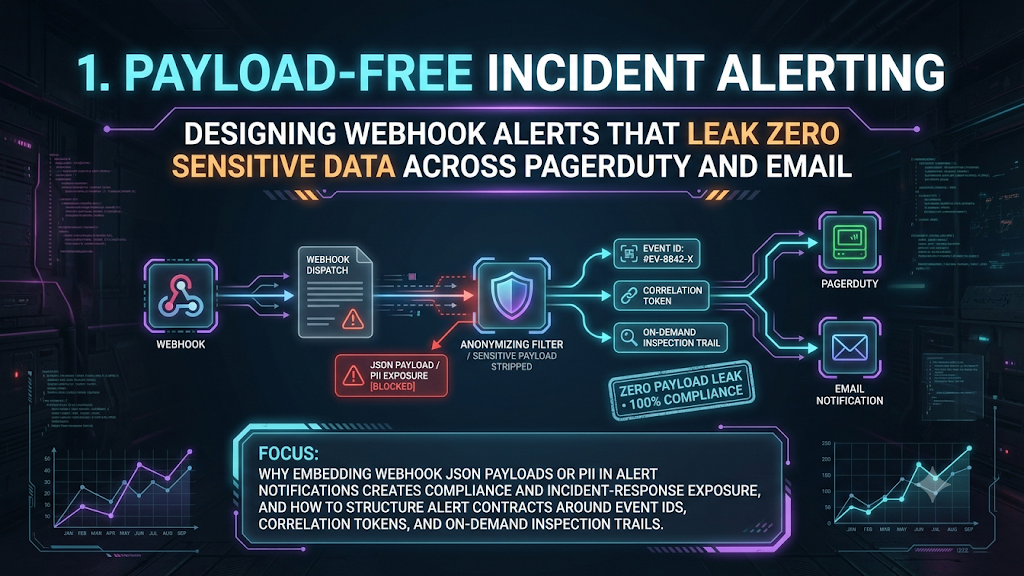
Payload-Free Incident Alerting: Designing Webhook Alerts That Keep Sensitive Data Out of PagerDuty and Email
Incident response pipelines depend on real-time webhooks, push notifications and automated escalation tools such as PagerDuty, Jira Service Management (the successor to Opsgenie), Slack and email. When an application throws an unhandled exception or a service breaches an operational threshold, a monitoring platform builds an event and sends it to the on-call responder.
A common anti-pattern has taken hold in many teams: embedding rich application data, such as SQL queries, stack traces, request bodies and personally identifiable information (PII), directly in the notification payload.
Full-context alerts give the on-call engineer instant visibility. They also copy sensitive data into third-party SaaS platforms, mail servers, mobile push pipelines and chat histories, none of which were chosen as places to store it. That raises compliance, data-leakage and supply-chain risk.
This guide describes Payload-Free Incident Alerting, an approach that separates the alert signal from sensitive context. The alert carries only non-sensitive metadata: an event ID, a correlation token, a severity and the affected service. The responder pulls the sensitive context on demand through an authenticated, audited channel.
No design guarantees that nothing sensitive ever leaks. Metadata such as service names, alert rule names and free-text summaries can still reveal information if teams put the wrong things in them. The goal is to shrink the exposure to a small, reviewable surface.
1. The Threat Model: How Rich Webhook Payloads Spread Sensitive Data
The anatomy of an over-detailed alert
Consider a database failure alert from an e-commerce service. In a payload-heavy design, the monitoring tool captures the exception and forwards everything it has to PagerDuty or an email list:
{
  "event_type": "database_query_failure",
  "severity": "critical",
  "timestamp": "2026-11-23T14:22:05Z",
  "details": {
    "error": "Query execution timed out for user_id: 89412",
    "failed_query": "SELECT * FROM payment_methods WHERE card_number = '4532-xxxx-xxxx-8891' AND user_email = 'john.doe@example.com'",
    "stack_trace": "At OrderProcessor.pay() line 142 ... AuthToken: eyJhbGciOiJIUzI1Ni..."
  }
}
This one payload carries several distinct problems:
- Personal data: an email address and an internal user identifier, both of which count as personal data under most privacy laws.
- Payment data handling: the card number is masked here, but real-world exceptions often contain unmasked values. The query also shows that the application looks up records by card number, which is a design smell in its own right.
- Credential leakage: a JWT captured in a stack trace may be replayable until it expires or is revoked.
- Internal architecture disclosure: table names, query shapes and code paths help an attacker map your system.
OWASP’s Logging Cheat Sheet makes the same point for logs generally: access tokens, authentication secrets and sensitive personal data should be excluded, masked or hashed rather than recorded directly. Alert payloads are copies of log data that travel further than logs usually do.
The blast radius of alert channels
An alert does not stay in one vault. It fans out across systems with different owners, retention rules and access models:
- Email (SMTP/IMAP): Messages pass through several mail transfer agents. SMTP transport encryption is typically opportunistic, so a given hop is not guaranteed to use TLS. At rest, message bodies usually sit unencrypted at the application level in server stores, user mailboxes and device caches.
- Third-party incident platforms: SaaS providers retain incident and alert data under their own retention rules. If you send sensitive fields, those fields are now in a system you do not fully control, and in scope for any security incident at that vendor.
- Mobile push: Push notifications on iOS and Android are delivered through Apple’s and Google’s push services. Depending on device settings, notification text can appear on the lock screen.
- Team chat: Alerts forwarded to Slack or Microsoft Teams persist in channel history for as long as your workspace retention policy says, and can be included in exports and eDiscovery.
A note on tooling: Atlassian ended new sales of Opsgenie on June 4, 2025 and will end support on April 5, 2027, after which access is shut off and unmigrated data is deleted. Teams still on Opsgenie should plan their move to Jira Service Management or Compass. Their alert templates need the same review described here, because the destination product changes the notification path but not the underlying risk.
2. Regulatory and Compliance Exposure
Putting personal data, health data or cardholder data in alert payloads does not automatically violate a regulation. It does widen your compliance scope, and it makes your safeguards harder to demonstrate. The table maps each framework to the relevant provisions and the realistic risk.
| Framework | Relevant provisions | Realistic risk from payload-heavy alerts |
|---|---|---|
| GDPR (EU/EEA) | Art. 5(1)(c) data minimisation; Art. 25 data protection by design; Art. 28 processors; Art. 32 security of processing; Art. 33 breach notification | Sending personal data to an alerting vendor makes that vendor a processor, which requires a data processing agreement and a lawful basis. If the vendor or an inbox is compromised, the controller must notify the supervisory authority without undue delay, where feasible within 72 hours of becoming aware, unless the breach is unlikely to result in a risk to individuals. Minimising what you send reduces both the likelihood and the severity of that event. |
| HIPAA (US) | Security Rule administrative safeguards (45 CFR § 164.308), technical safeguards (§ 164.312), business associate requirements | ePHI in alerts is sent to vendors that may need a business associate agreement. Under the current Security Rule, encryption of data at rest and in transit is an addressable specification, not an unconditional requirement. HHS proposed in January 2025 to make encryption required with limited exceptions. As of late 2026 that proposal is not final, and the regulatory agenda targets July 2027 for final action. Plan around the current rule but expect it to tighten. |
| PCI DSS v4.0.1 | Requirement 3 (protect stored account data, including masking PAN when displayed and rendering stored PAN unreadable); Requirement 4 (strong cryptography when PAN is sent over open, public networks, including via end-user messaging such as email) | Email, chat and third-party incident tools can pull more systems into PCI scope. PAN display is limited to the first six and last four digits, and only personnel with a business need may see more. v4.0.1 has been the only active version since v3.2.1 was retired on December 31, 2024, and all future-dated requirements have been mandatory since March 31, 2025. |
| SOC 2 | Trust Services Criteria: CC6.1 (logical access), CC6.6 (boundary protection), CC6.7 (restricting transmission and movement of information); Confidentiality criteria C1.1 and C1.2 | SOC 2 is an attestation framework, not a law. Uncontrolled copies of sensitive data in third-party channels make access and confidentiality controls harder to evidence, and can lead to audit exceptions. |
An authentication token is not cardholder data, but it is a credential. Its leakage is a security incident under almost any framework, regardless of the compliance label.
3. The Payload-Free Paradigm: Decoupling Signal from Context
Payload-Free Incident Alerting is an architectural pattern in which alert notifications carry only non-sensitive operational metadata. Application payloads, customer data and execution state are withheld from the notification.
Instead of pushing context to every channel, the architecture makes the responder, or an automation system, pull context on demand from a store you control.
Comparative architecture overview
Key differences
| Dimension | Traditional payload alerts | Payload-free alerts |
|---|---|---|
| Payload content | Stack traces, PII, raw request bodies, SQL | Event ID, correlation token, severity, service scope |
| Data residency | Copied across email, SaaS vendors, chat and mobile push | Held in storage you control |
| Access control | Anyone with access to the mailbox, channel or incident | SSO plus role-based access control (RBAC), checked at read time |
| Auditability | Little or no record of who read what | A log entry for every payload view or denied attempt |
| Retention | Whatever each vendor, mailbox and chat policy happens to be | Short, explicit TTL in one place, enforced on read |
This approach follows the zero-trust principle described in NIST SP 800-207: do not grant access based on network location or the channel a message arrived on. Authenticate and authorise each request for sensitive data.
4. Architectural Blueprint
A payload-free pipeline has three components:
- Event producer and payload sanitiser: captures the exception, extracts operational metadata, writes the raw context to the vault and emits a payload-free alert.
- Payload vault: short-lived, encrypted storage, for example DynamoDB or S3 encrypted with AWS KMS keys, or HashiCorp Vault, with expiry policies.
- Inspection portal: an internal service behind SSO and RBAC that lets authorised responders view the payload while handling an incident.
End-to-end sequence
5. Designing the Alert Contract
The contract must give the responder enough to triage (severity, owning service, which rule fired) without revealing business logic or customer data.
Schema
{
  "$schema": "https://json-schema.org/draft/2020-12/schema",
  "title": "PayloadFreeAlertContract",
  "type": "object",
  "required": [
    "event_id",
    "correlation_id",
    "timestamp",
    "severity",
    "service_name",
    "environment",
    "alert_rule",
    "inspection_uri"
  ],
  "properties": {
    "event_id": {
      "type": "string",
      "format": "uuid",
      "description": "Unique identifier for this alert. Must be unguessable (for example a random UUID v4), but authorisation must never rely on that."
    },
    "correlation_id": {
      "type": "string",
      "description": "W3C Trace Context traceparent value or another distributed tracing correlation token."
    },
    "timestamp": {
      "type": "string",
      "format": "date-time",
      "description": "RFC 3339 / ISO 8601 UTC timestamp of alert generation."
    },
    "severity": {
      "type": "string",
      "enum": ["critical", "error", "warning", "info"],
      "description": "Matches the PagerDuty Events API v2 severity values."
    },
    "service_name": {
      "type": "string",
      "examples": ["payment-gateway-service"]
    },
    "environment": {
      "type": "string",
      "enum": ["production", "staging", "development"]
    },
    "region": {
      "type": "string",
      "examples": ["eu-west-1"]
    },
    "alert_rule": {
      "type": "string",
      "examples": ["HIGH_HTTP_5XX_RATE_SLI_BREACH"]
    },
    "inspection_uri": {
      "type": "string",
      "format": "uri",
      "examples": ["https://telemetry.internal.example.com/alerts/inspect?id=8f3b20c1-3d44-482a-9e12-32a768f51201"]
    },
    "inspection_status": {
      "type": "string",
      "enum": ["AVAILABLE", "PAYLOAD_UNAVAILABLE"],
      "description": "Set to PAYLOAD_UNAVAILABLE when the vault write failed or timed out."
    }
  },
  "additionalProperties": false
}
Before and after
❌ Before: payload-heavy webhook
{
  "event": "USER_SIGNUP_FAILED",
  "user_email": "alice@company-client.com",
  "ip_address": "198.51.100.45",
  "request_body": {
    "name": "Alice Smith",
    "ssn_last4": "6789",
    "address": "123 Main St, Austin TX"
  },
  "error_message": "Duplicate key error on index: ssn_last4"
}
✅ After: payload-free webhook
{
  "event_id": "8f3b20c1-3d44-482a-9e12-32a768f51201",
  "correlation_id": "00-4bf92f3577b34da6a3ce929d0e0e4736-00f067aa0ba902b7-01",
  "timestamp": "2026-11-23T14:30:00Z",
  "severity": "error",
  "service_name": "identity-auth-service",
  "environment": "production",
  "region": "eu-west-1",
  "alert_rule": "ERR_AUTH_PERSISTENCE_FAILURE",
  "inspection_uri": "https://telemetry.internal.example.com/alerts/inspect?id=8f3b20c1-3d44-482a-9e12-32a768f51201",
  "inspection_status": "AVAILABLE"
}
Two rules keep the contract honest:
- Fixed vocabularies only. Use enumerated alert rule names, not free text built from exception messages. Exception messages often echo user input, as the “Duplicate key” example above shows.
- Review the metadata, too. A service name like
vip-customer-export-jobor a rule name containing a customer name leaks information even though no payload is attached.
6. PagerDuty and Email Integrations
6.1 A payload-free PagerDuty Events API v2 request
The Events API v2 accepts a payload object with summary (required, up to 1,024 characters), source, severity (critical, error, warning or info), component, group, class, timestamp and a free-form custom_details object. Links go in a top-level links array, each with an href and optional text. The dedup_key can be up to 255 characters and groups events into a single alert.
For a payload-free alert, leave out custom_details entirely and use the links array to point at your inspection portal:
curl -X POST https://events.pagerduty.com/v2/enqueue \
  -H "Content-Type: application/json" \
  -d '{
    "routing_key": "<32-character-integration-key>",
    "event_action": "trigger",
    "dedup_key": "identity-auth-service:ERR_AUTH_PERSISTENCE_FAILURE",
    "payload": {
      "summary": "ERROR: identity-auth-service ERR_AUTH_PERSISTENCE_FAILURE (production, eu-west-1)",
      "severity": "error",
      "source": "identity-auth-service.prod-eu-west-1",
      "component": "oauth-provider",
      "group": "identity-team",
      "class": "persistence_failure",
      "timestamp": "2026-11-23T14:30:00Z"
    },
    "links": [
      {
        "href": "https://telemetry.internal.example.com/alerts/inspect?id=8f3b20c1-3d44-482a-9e12-32a768f51201",
        "text": "Secure payload inspection (SSO required)"
      }
    ]
  }'
Three details matter in practice:
- The summary is the most widely replicated field. It becomes the incident title and typically appears in push notifications, SMS, email and chat integrations. Build it only from fixed vocabularies such as service name, rule name, environment and region, never from exception text.
- Keep the integration key out of source control. It is a credential that lets anyone create alerts against that service. A routing key works only in its own PagerDuty service region.
- Check what your integrations forward. PagerDuty’s Slack, Teams and email integrations may relay the summary and links, so the same discipline applies downstream.
6.2 Email alert design
Prometheus Alertmanager’s default webhook and email notifications include every label and annotation on the alert, so any PII in a label or annotation will be sent in full. Treat Prometheus labels as public metadata. Never put user identifiers, emails or request values in labels or annotations, and use a custom template that renders only an allowlist of fields.
Subject: [CRITICAL] identity-auth-service: ERR_AUTH_PERSISTENCE_FAILURE (production)

----------------------------------------------------------------------
INCIDENT ALERT (PAYLOAD-FREE)
----------------------------------------------------------------------
Service:        identity-auth-service
Environment:    production (eu-west-1)
Severity:       critical
Alert rule:     ERR_AUTH_PERSISTENCE_FAILURE
Timestamp:      2026-11-23T14:30:00Z
Correlation ID: 00-4bf92f3577b34da6a3ce929d0e0e4736-00f067aa0ba902b7-01
Event ID:       8f3b20c1-3d44-482a-9e12-32a768f51201

----------------------------------------------------------------------
PAYLOAD ACCESS
----------------------------------------------------------------------
Exception details and request data are intentionally not sent by email.

Inspect full context (SSO login and an on-call role are required):
https://telemetry.internal.example.com/alerts/inspect?id=8f3b20c1-3d44-482a-9e12-32a768f51201
7. The On-Demand Inspection Trail and Storage
The payload store and its access path need three properties: encryption at rest, short and enforced lifespan, and tamper-resistant access logs.
Storing ephemeral payloads in DynamoDB (TypeScript)
Amazon DynamoDB encrypts all table data at rest by default, using an AWS-owned key. You can choose an AWS-managed or customer-managed KMS key instead, which gives you key policies and CloudTrail visibility. For an extra layer, encrypt sensitive fields client-side before writing them.
DynamoDB’s time-to-live (TTL) feature is a best-effort cleanup process, not a precise deadline. AWS documents that expired items are typically deleted within a few days, and its support guidance says deletion typically happens within 48 hours but is not an SLA. Expired items that are not yet deleted still appear in reads. You must therefore check the expiry yourself on every read, which the portal code below does.
import { randomUUID } from "node:crypto";
import { DynamoDBClient } from "@aws-sdk/client-dynamodb";
import {
  DynamoDBDocumentClient,
  PutCommand,
  GetCommand,
} from "@aws-sdk/lib-dynamodb";

const docClient = DynamoDBDocumentClient.from(
  new DynamoDBClient({ region: "eu-west-1" })
);

const TABLE = "AlertPayloadStore"; // table uses a customer-managed KMS key
const BASE_URL = "https://telemetry.internal.example.com/alerts/inspect";

interface StoreInput {
  serviceName: string;
  alertRule: string;
  severity: "critical" | "error" | "warning" | "info";
  traceparent?: string;
  rawPayload: Record<string, unknown>; // sensitive; never leaves the vault
  ttlHours?: number;
}

export async function storePayloadAndBuildSignal(input: StoreInput) {
  const eventId = randomUUID();
  const now = new Date();
  const expiresAt =
    Math.floor(now.getTime() / 1000) + (input.ttlHours ?? 48) * 3600;

  let inspectionStatus: "AVAILABLE" | "PAYLOAD_UNAVAILABLE" = "AVAILABLE";
  try {
    await docClient.send(
      new PutCommand({
        TableName: TABLE,
        Item: {
          EventId: eventId,
          ServiceName: input.serviceName,
          Payload: input.rawPayload,
          ExpiresAt: expiresAt, // TTL attribute: Number, epoch seconds
          CreatedAt: now.toISOString(),
        },
        ConditionExpression: "attribute_not_exists(EventId)",
      }),
      { abortSignal: AbortSignal.timeout(500) } // never block alert delivery
    );
  } catch {
    inspectionStatus = "PAYLOAD_UNAVAILABLE";
  }

  // Payload-free contract: metadata only
  return {
    event_id: eventId,
    correlation_id: input.traceparent ?? randomUUID(),
    timestamp: now.toISOString(),
    severity: input.severity,
    service_name: input.serviceName,
    environment: process.env.DEPLOY_ENV ?? "production",
    region: process.env.AWS_REGION ?? "unknown",
    alert_rule: input.alertRule,
    inspection_uri: `${BASE_URL}?id=${eventId}`,
    inspection_status: inspectionStatus,
  };
}

export async function fetchFromVault(eventId: string) {
  const { Item } = await docClient.send(
    new GetCommand({ TableName: TABLE, Key: { EventId: eventId } })
  );
  // TTL deletion is lazy: enforce expiry ourselves.
  if (!Item || Item.ExpiresAt <= Math.floor(Date.now() / 1000)) return null;
  return Item;
}
Authorising and auditing every view
An event ID in a URL is an identifier, not a credential. The portal must authenticate the user, authorise the request and write an audit record before returning any data.
import type { Request, Response } from "express";
import { AuditLogger } from "./audit-logger";
import { fetchFromVault } from "./vault";

export async function handlePayloadInspection(req: Request, res: Response) {
  const user = req.user; // from a verified OIDC session
  const eventId = String(req.query.id ?? "");

  // 1. Authorise: role check (tighten further with per-service ownership)
  if (!user?.groups?.includes("OnCallEngineers")) {
    await AuditLogger.log({ outcome: "DENIED", userId: user?.id, eventId });
    return res.status(403).json({ error: "Access denied." });
  }

  // 2. Fetch (expired items are treated as missing)
  const item = await fetchFromVault(eventId);
  if (!item) {
    await AuditLogger.log({ outcome: "NOT_FOUND", userId: user.id, eventId });
    return res.status(404).json({ error: "Payload expired or not found." });
  }

  // 3. Write the audit record BEFORE returning data; fail closed if it fails
  await AuditLogger.log({
    outcome: "GRANTED",
    userId: user.id, // an ID, not an email, to keep the audit trail itself low in PII
    eventId,
    at: new Date().toISOString(),
    sourceIp: req.ip,
  });

  return res.status(200).json(item.Payload);
}
For the audit trail to be tamper-resistant, ship records to write-once storage, for example an S3 bucket with Object Lock, or a log service that your application role cannot modify. Where the data store is on AWS, CloudTrail data events for DynamoDB can independently record who accessed the table, but they are not enabled by default and add cost.
8. Operational Edge Cases and Fallbacks
8.1 Payload store outages
If the vault is down during a major incident, alert delivery must win over payload persistence.
- Mitigation: Put a short timeout on the vault write (the code above uses 500 ms). On failure, send the payload-free alert anyway with
inspection_status: "PAYLOAD_UNAVAILABLE". The responder can fall back to application logs, which are subject to their own access controls. - Never fall back to embedding raw data in the webhook. A degraded alert is better than a leaked one.
8.2 Alert storms
During cascading failures, a service can emit thousands of alerts in a short time, which can overload both the vault and your incident tool.
- Mitigation: Deduplicate at the producer. Use a stable
dedup_keysuch asservice:alert_ruleso PagerDuty groups repeats into one alert, and store the payload only for the first occurrence in a rolling window, for example five minutes. Count the rest in your own metrics. Expect upstream APIs to throttle bursts, and queue or batch outbound signals accordingly.
8.3 Sanitisation proxies for legacy systems
Systems that cannot be changed quickly can send their webhooks through a sanitisation proxy such as a small service, an API gateway transform or an Envoy Lua/Wasm filter. The proxy stores the original payload in the vault and forwards only a payload-free contract to external destinations.
Prefer an allowlist design in which the proxy builds the outgoing message from known-safe fields. Regex scrubbing of emails, card numbers and tokens is a useful safety net, but it is a denylist. Denylists miss new formats, free-text fields and encoded values, so do not rely on them as the primary control.
9. Checklist for Engineering and Security Teams
- Audit existing alerts: review historical PagerDuty incidents, Slack alert channels, email templates and Alertmanager labels and annotations for PII, tokens and raw queries.
- Adopt a minimal contract: limit outgoing alerts to event ID, correlation token, timestamp, severity, service, environment, rule name and an inspection link.
- Build summaries from fixed vocabularies: never include exception messages or request values in
summary, titles or subjects. - Use a short-lived encrypted vault: choose an explicit retention period, and enforce expiry on read in addition to any TTL cleanup.
- Gate context behind SSO and RBAC: authenticate and authorise every inspection request, and do not treat the event ID as a secret.
- Keep tamper-resistant audit logs: record granted, denied and not-found attempts, and write the record before returning data.
- Review push and chat paths: check what PagerDuty, Jira Service Management and chat integrations forward to mobile lock screens and channels, and set chat retention policies for alert channels.
- Put sanitisation in front of legacy producers: use allowlist-based proxies, with pattern-based redaction as a second layer.
- Check vendor agreements: confirm data processing agreements (GDPR) or business associate agreements (HIPAA) where any regulated data could still reach a vendor.
- Plan tooling migrations: if you use Opsgenie, finish moving before its end of support on April 5, 2027, and re-verify templates in the new tool.
Payload-free alerting does not remove the need for good logging hygiene or access control. It limits the number of systems that hold sensitive incident data to one you control, with authenticated access, an audit trail and a defined lifespan, while keeping alerts fast and actionable for the people on call.
Further reading
- Amazon DynamoDB Developer Guide: Using time to live (TTL) in DynamoDB
- Atlassian: Opsgenie end of sale and end of support announcement
- HHS: HIPAA regulatory initiatives and Security Rule NPRM
- PagerDuty: Events API v2 overview
- PCI Security Standards Council: PCI DSS v4.0.1 (June 2024)