Orchestrating Long-Running Workflows with AWS Step Functions and Webhook Callbacks
Orchestrating Long-Running Workflows with AWS Step Functions and Webhook Callbacks Enterprise business processes rarely run in real time.
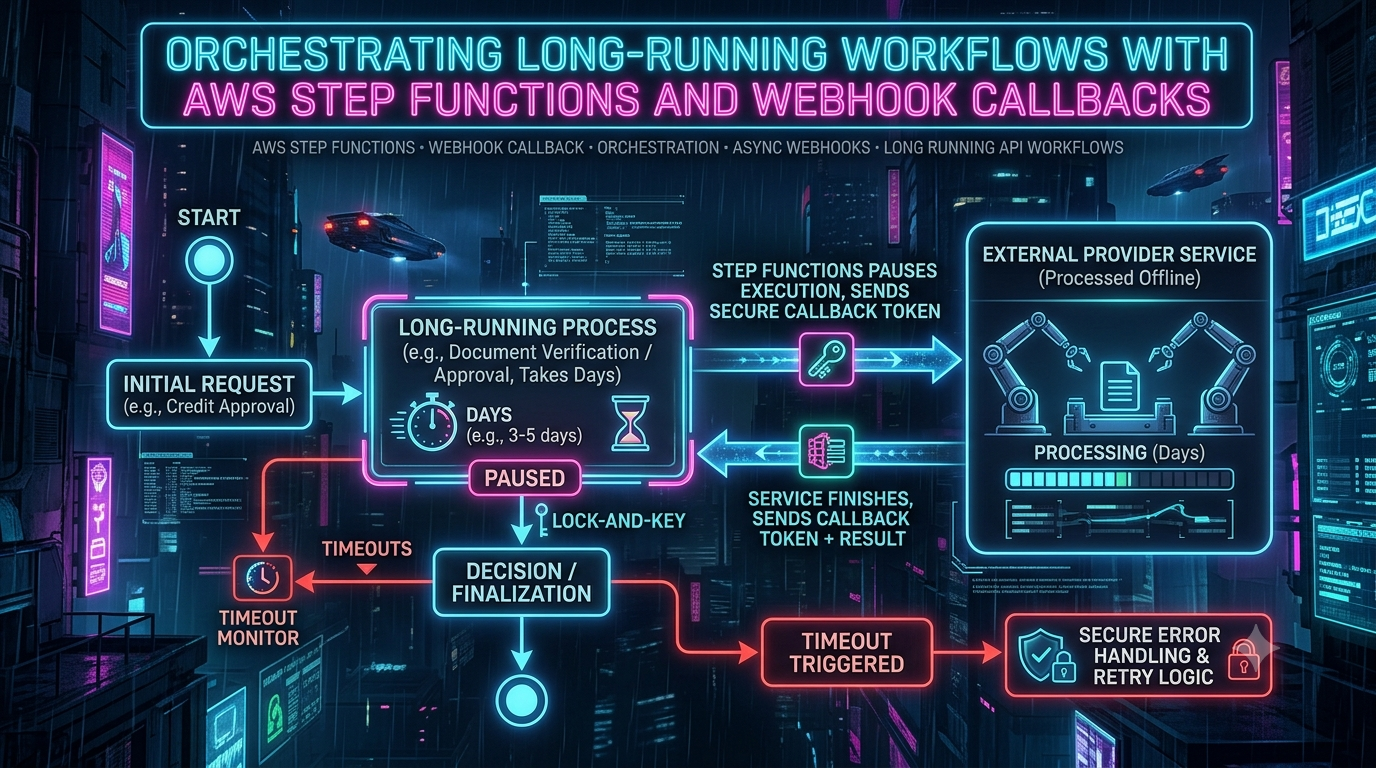
Orchestrating Long-Running Workflows with AWS Step Functions and Webhook Callbacks
Enterprise business processes rarely run in real time. Know Your Customer (KYC) identity checks, mortgage underwriting, background screening, document signing, and physical fulfillment can take hours, days, or even weeks to finish. When your software integrates with third-party systems like these, you face a core architectural question:
How do you pause a workflow reliably and cheaply until an external system calls you back with a webhook?
In this guide you will build that pattern with AWS Step Functions and the .waitForTaskToken callback integration. We will cover the state machine, the dispatch and webhook-receiver Lambdas, token mapping strategies, signature verification, timeouts, duplicate deliveries, cost, observability, and where the newer AWS Lambda durable functions fit as an alternative.
Why Polling Breaks Down for Multi-Day Processes
| Approach | Why it struggles with long-running work |
|---|---|
| Lambda that polls in a loop | A single Lambda invocation is capped at 15 minutes, and you pay for compute while it sits idle waiting. |
| Cron jobs / database polling | Adds lock contention and hand-written state tracking, and hammers the vendor's API, which raises rate-limit risk. |
| Custom event loops or long-lived services | You now own uptime, deployment, and recovery. A restart can lose in-memory state. |
The event-driven alternative
Instead of asking the vendor "are you done yet?", let the vendor tell you:
- Your workflow calls the provider's API (Stripe, Persona, DocuSign, Plaid, or any system that supports callbacks).
- The workflow pauses. While it waits, you are not billed for compute, and Step Functions bills Standard Workflows per state transition, not per hour of waiting.
- When the provider finishes, it sends an HTTP POST (a webhook) to your endpoint.
- Your receiver verifies the request and tells Step Functions to resume.
This works because Standard Workflows can run for up to one year (service quotas). Express Workflows are limited to five minutes and do not support the callback pattern at all.
How .waitForTaskToken Works
When you append .waitForTaskToken to a task's Resource, Step Functions generates a task token for that specific task run and exposes it through the Context object as $$.Task.Token. The state then pauses until something calls SendTaskSuccess or SendTaskFailure with that token.
A few facts about tokens worth knowing before you design around them:
- Length: a task token can be up to 2,048 characters (SendTaskSuccess API reference).
- Same-account only: tokens must be returned by principals in the same AWS account as the state machine. They will not work from another account (Step Functions docs).
- Timeouts rotate the token: if a callback task times out, Step Functions generates a new random token, so a late callback using the old one cannot resume anything.
- Standard Workflows only: callback (
.waitForTaskToken) and job-run (.sync) patterns are not supported in Express Workflows. - Broad support: the callback pattern works with Lambda, SQS, SNS, EventBridge, ECS/Fargate, Amazon Bedrock, nested Step Functions executions, and AWS SDK integrations whose API has a field where the token can be placed.
End-to-end flow
sequenceDiagram
    autonumber
    participant SFN as Step Functions
    participant D as Dispatch Lambda
    participant DB as DynamoDB
    participant V as Vendor (e.g. KYC API)
    participant GW as API Gateway
    participant R as Receiver Lambda

    SFN->>D: Invoke with Task.Token (lambda:invoke.waitForTaskToken)
    D->>DB: Save referenceId → taskToken
    D->>V: Create verification (referenceId, callback URL)
    Note over SFN: Execution paused (up to TimeoutSeconds)
    V-->>GW: Webhook POST, hours or days later
    GW->>R: Invoke
    R->>R: Verify signature and timestamp
    R->>DB: Look up taskToken by referenceId
    R->>SFN: SendTaskSuccess / SendTaskFailure
    SFN->>SFN: Resume workflow
Step-by-Step Implementation
We will build a document-verification pipeline (a passport or business licence check) that pauses while an external provider does its analysis.
1. The state machine
{
  "Comment": "Long-running identity verification using a Step Functions webhook callback",
  "StartAt": "InitiateDocumentVerification",
  "States": {
    "InitiateDocumentVerification": {
      "Type": "Task",
      "Resource": "arn:aws:states:::lambda:invoke.waitForTaskToken",
      "Parameters": {
        "FunctionName": "arn:aws:lambda:us-east-1:123456789012:function:DispatchVerificationRequest",
        "Payload": {
          "userId.$": "$.userId",
          "documentUrl.$": "$.documentUrl",
          "taskToken.$": "$$.Task.Token"
        }
      },
      "TimeoutSeconds": 259200,
      "ResultPath": "$.verification",
      "Retry": [
        {
          "ErrorEquals": [
            "Lambda.ServiceException",
            "Lambda.AWSLambdaException",
            "Lambda.SdkClientException",
            "Lambda.TooManyRequestsException"
          ],
          "IntervalSeconds": 2,
          "MaxAttempts": 3,
          "BackoffRate": 2.0
        }
      ],
      "Catch": [
        {
          "ErrorEquals": ["States.Timeout"],
          "ResultPath": "$.error",
          "Next": "HandleVerificationTimeout"
        },
        {
          "ErrorEquals": ["States.ALL"],
          "ResultPath": "$.error",
          "Next": "HandleVerificationFailure"
        }
      ],
      "Next": "ApproveUserAccount"
    },
    "ApproveUserAccount": {
      "Type": "Task",
      "Resource": "arn:aws:states:::lambda:invoke",
      "Parameters": {
        "FunctionName": "arn:aws:lambda:us-east-1:123456789012:function:ApproveUser",
        "Payload": {
          "userId.$": "$.userId",
          "verificationId.$": "$.verification.verificationId",
          "status": "APPROVED"
        }
      },
      "End": true
    },
    "HandleVerificationTimeout": {
      "Type": "Task",
      "Resource": "arn:aws:states:::lambda:invoke",
      "Parameters": {
        "FunctionName": "arn:aws:lambda:us-east-1:123456789012:function:EscalateToManualReview",
        "Payload": {
          "userId.$": "$.userId",
          "reason": "External verification vendor did not call back within 3 days."
        }
      },
      "End": true
    },
    "HandleVerificationFailure": {
      "Type": "Task",
      "Resource": "arn:aws:states:::lambda:invoke",
      "Parameters": {
        "FunctionName": "arn:aws:lambda:us-east-1:123456789012:function:NotifyUserFailure",
        "Payload": {
          "userId.$": "$.userId",
          "error.$": "$.error"
        }
      },
      "End": true
    }
  }
}
Points worth noticing in this definition:
TimeoutSecondsis mandatory in practice. Without it, a task waiting for a token can wait until the one-year execution limit. AWS lists timeouts to avoid stuck executions as a best practice.259200seconds is three days.- A timeout surfaces as
States.Timeout. That is the error name you catch in the state machine.TaskTimedOutis something different: it is an exception returned by theSendTask*API calls (more on that below). States.ALLmust stand alone and come last. AWS requires the wildcard to be the only entry in itsErrorEqualsarray and to be in the last catcher. Listing a custom error name next to it is invalid.- Use
ResultPathinCatch. By default a catcher replaces the state's input with the error object, and you loseuserId."ResultPath": "$.error"keeps the original input and adds the error beside it. ResultPathon the task puts the callback payload under$.verificationinstead of overwriting the input.
Heartbeats: use them only if your vendor can send them.
HeartbeatSecondsmakes Step Functions fail the task withStates.Timeout(orStates.HeartbeatTimeoutinsideCatch/Retry) unless someone callsSendTaskHeartbeatwithin that window. A typical webhook vendor will never do that. If you setHeartbeatSeconds: 86400against such a vendor, your three-day wait would die after one day. Heartbeats suit workers you control.
Using JSONata instead of JSONPath
Step Functions supports JSONata as a query language. In a JSONata state you use Arguments instead of Parameters, and you read the token from the context object:
"Arguments": {
  "FunctionName": "arn:aws:lambda:us-east-1:123456789012:function:DispatchVerificationRequest",
  "Payload": {
    "userId": "{% $states.input.userId %}",
    "documentUrl": "{% $states.input.documentUrl %}",
    "taskToken": "{% $states.context.Task.Token %}"
  }
}
Set "QueryLanguage": "JSONata" at the top level (or per state) to opt in. See Transforming data with JSONata.
Not everything needs a Lambda. If your integration can be a message,
sqs:sendMessage.waitForTaskToken,sns:publish.waitForTaskToken, andevents:putEvents.waitForTaskTokenlet you hand the token to a queue, topic, or event bus instead.
2. Dispatching the request to the vendor
The dispatch Lambda receives the task token, sends the job to the vendor, and returns. Its return value does not complete the task. Step Functions stays in the waiting state until SendTaskSuccess or SendTaskFailure arrives.
Rather than handing the raw task token to the vendor, generate your own correlation ID, store referenceId → taskToken in DynamoDB before calling the vendor, and send only the correlation ID. Writing the mapping first also removes the race where a very fast vendor calls back before your record exists. Section 4 explains why this is the safer default.
// lambda/dispatchVerification.ts
import { randomUUID } from 'node:crypto';
import { DynamoDBClient } from '@aws-sdk/client-dynamodb';
import { DynamoDBDocumentClient, PutCommand } from '@aws-sdk/lib-dynamodb';

const ddb = DynamoDBDocumentClient.from(new DynamoDBClient({}));

const TIMEOUT_SECONDS = 259200;   // keep in sync with the state machine
const RECORD_BUFFER_SECONDS = 86400;

interface DispatchEvent {
  userId: string;
  documentUrl: string;
  taskToken: string;
}

export const handler = async (event: DispatchEvent) => {
  const { userId, documentUrl, taskToken } = event;
  const referenceId = randomUUID();
  const now = Math.floor(Date.now() / 1000);

  // 1. Persist the mapping first.
  await ddb.send(new PutCommand({
    TableName: process.env.TOKEN_TABLE!,
    Item: {
      referenceId,
      taskToken,
      userId,
      createdAt: now,
      expiresAt: now + TIMEOUT_SECONDS + RECORD_BUFFER_SECONDS, // DynamoDB TTL attribute (epoch seconds)
    },
  }));

  // 2. Call the vendor. Node.js 18+ Lambda runtimes include fetch().
  const response = await fetch(`${process.env.VENDOR_API_ENDPOINT}/v1/verifications`, {
    method: 'POST',
    headers: {
      Authorization: `Bearer ${process.env.VENDOR_API_KEY}`,
      'Content-Type': 'application/json',
      // If the vendor supports idempotency keys, send referenceId here.
    },
    body: JSON.stringify({
      reference_id: referenceId,
      document_url: documentUrl,
      callback_url: process.env.WEBHOOK_RECEIVER_URL,
    }),
  });

  if (!response.ok) {
    // Throwing fails the task immediately; the state machine's Catch handles it.
    throw new Error(`DispatchFailed: vendor responded ${response.status}`);
  }

  // Do NOT resume the workflow here. Step Functions keeps waiting for the callback.
  return { status: 'DISPATCHED', referenceId };
};
Because the state machine can retry this Lambda on transient service errors, make the vendor call idempotent where the vendor allows it, so a retry does not create a second job.
3. The inbound webhook receiver
The vendor calls a public API Gateway endpoint backed by a Lambda function. The function must: verify authenticity, find the task token, and report success or failure to Step Functions.
This example uses an HTTP API (payload format 2.0, where header names arrive lowercased) and a signature scheme of the form t=<timestamp>,v1=<hex HMAC>, modelled on the approach used by Stripe and Persona.
// lambda/webhookReceiver.ts
import type { APIGatewayProxyEventV2, APIGatewayProxyResultV2 } from 'aws-lambda';
import { SFNClient, SendTaskSuccessCommand, SendTaskFailureCommand } from '@aws-sdk/client-sfn';
import { DynamoDBClient } from '@aws-sdk/client-dynamodb';
import { DynamoDBDocumentClient, GetCommand } from '@aws-sdk/lib-dynamodb';
import { createHmac, timingSafeEqual } from 'node:crypto';

const sfn = new SFNClient({});
const ddb = DynamoDBDocumentClient.from(new DynamoDBClient({}));
const TOLERANCE_SECONDS = 300; // reject signatures older than 5 minutes

const reply = (statusCode: number, message: string): APIGatewayProxyResultV2 => ({
  statusCode,
  headers: { 'Content-Type': 'application/json' },
  body: JSON.stringify({ message }),
});

export const handler = async (event: APIGatewayProxyEventV2): Promise<APIGatewayProxyResultV2> => {
  // Sign-check the exact bytes the vendor sent, before any JSON parsing.
  const rawBody = event.isBase64Encoded
    ? Buffer.from(event.body ?? '', 'base64').toString('utf8')
    : event.body ?? '';

  if (!verifySignature(rawBody, event.headers['x-vendor-signature'], process.env.WEBHOOK_SECRET!)) {
    console.error('Invalid webhook signature');
    return reply(401, 'Unauthorized');
  }

  let payload: any;
  try {
    payload = JSON.parse(rawBody);
  } catch {
    return reply(400, 'Malformed JSON');
  }
  // Validate the payload shape with a schema library (Zod, Joi, ...) before trusting any field.

  const referenceId = payload?.reference_id;
  if (typeof referenceId !== 'string') return reply(400, 'Missing reference_id');

  // Look up the task token. TTL deletion is not instant, so also check expiry ourselves.
  const { Item } = await ddb.send(new GetCommand({
    TableName: process.env.TOKEN_TABLE!,
    Key: { referenceId },
  }));
  const now = Math.floor(Date.now() / 1000);
  if (!Item || Item.expiresAt <= now) {
    console.warn(`No live task token for reference ${referenceId}`);
    return reply(404, 'Unknown or expired reference');
  }

  try {
    if (payload.status === 'PASSED') {
      await sfn.send(new SendTaskSuccessCommand({
        taskToken: Item.taskToken,
        output: JSON.stringify({
          verificationId: payload.id,
          verifiedAt: payload.completed_at,
          confidenceScore: payload.score,
          status: 'VERIFIED',
        }),
      }));
    } else {
      await sfn.send(new SendTaskFailureCommand({
        taskToken: Item.taskToken,
        error: 'VerificationFailedError',
        cause: JSON.stringify({
          reason: payload.failure_reason ?? 'Document check failed',
          vendorCode: payload.error_code,
        }),
      }));
    }
    return reply(200, 'Callback processed');
  } catch (err: any) {
    switch (err?.name) {
      case 'TaskTimedOut':      // token expired, or the task was already closed (e.g. duplicate delivery)
      case 'TaskDoesNotExist':
        console.warn(`Task already resolved or expired for ${referenceId}: ${err.message}`);
        return reply(200, 'Already resolved'); // acknowledge so the vendor stops retrying
      case 'InvalidToken':
        console.error(`Stored task token is invalid for ${referenceId}`);
        return reply(400, 'Invalid token');
      default:
        console.error('Unexpected error signalling Step Functions', err);
        return reply(500, 'Internal error'); // a retry is appropriate for transient failures
    }
  }
};

function verifySignature(rawBody: string, header: string | undefined, secret: string): boolean {
  if (!header) return false;
  const parts = Object.fromEntries(
    header.split(',').map((p) => p.trim().split('=') as [string, string]),
  );
  const { t, v1 } = parts;
  if (!t || !v1) return false;

  // Replay protection
  const ageSeconds = Math.abs(Date.now() / 1000 - Number(t));
  if (!Number.isFinite(ageSeconds) || ageSeconds > TOLERANCE_SECONDS) return false;

  const expected = createHmac('sha256', secret).update(`${t}.${rawBody}`).digest();
  const provided = Buffer.from(v1, 'hex');
  return provided.length === expected.length && timingSafeEqual(provided, expected);
}
Two design notes:
- Business outcome versus technical error. This example sends
SendTaskFailurewhen the vendor reports a failed check. Many teams prefer to callSendTaskSuccesswithstatus: "DECLINED"and branch with aChoicestate, reservingSendTaskFailurefor genuine errors. Either works. Pick one convention and keep it. - Payload size. The
outputyou pass toSendTaskSuccessis limited to 262,144 characters (256 KiB). If a vendor sends large artifacts such as images or full reports, store them in S3 and pass a reference.
Mapping Callback Tokens: Stateless vs. Stateful
Many vendors let you attach your own metadata to a request and echo it back in the webhook. That invites the stateless approach: put the task token in the vendor's metadata field and read it back on callback. It looks simple, but it has two practical problems.
- Size limits. A task token can reach 2,048 characters. Stripe metadata, for example, allows up to 50 keys with values of at most 500 characters, so a full token can simply not fit. (You would have to split it across keys, which is fragile.)
- Exposure. The token is the credential that resumes your workflow. Handing it to a third party means it is stored in the vendor's systems and may appear in their logs and dashboards.
The stateful approach stores the token in your own DynamoDB table and gives the vendor only an opaque reference ID.
| Stateless (token in vendor metadata) | Stateful (DynamoDB mapping) | |
|---|---|---|
| Mechanism | Task token travels through the vendor and comes back in the webhook | Your correlation ID travels through the vendor; the token stays in your table |
| Infrastructure | None extra | One DynamoDB table |
| Vendor requirements | Must accept and echo custom metadata, with room for a long value | Only needs to echo a reference or job ID |
| Token exposure | Token is stored by a third party | Token never leaves your account |
| Failure modes | Truncation if the vendor's field is too short | Lookup miss if the record expired or was never written |
Practical guidance for the stateful table:
- Key by your own
referenceId(a UUID you generate) rather than the vendor's job ID. You can write the record before calling the vendor, which closes the race where a fast callback arrives before you have stored the vendor's ID. - Use DynamoDB TTL for cleanup. The TTL attribute must be a Number holding a Unix epoch time in seconds. Set it to your task timeout plus a buffer.
- Do not rely on TTL for correctness. DynamoDB deletes expired items on a best-effort basis, typically within a few days, and expired items remain readable until then. Check the expiry in code (as the receiver above does) or use a filter expression. See DynamoDB TTL and working with expired items.
Example item:
{
  "referenceId": "3f2b6d3e-8a51-4c5e-9f0e-2f2d1c7b9a10",
  "taskToken": "AAAAKgAAAAIAAAAAAAAA...",
  "userId": "user_1234",
  "createdAt": 1790000000,
  "expiresAt": 1790345600
}
Production Security Practices
A webhook endpoint is a public URL that can resume your business process. Treat it accordingly.
1. Verify the signature, on the raw body, in constant time
Every reputable provider signs its webhooks. The details differ, so follow your vendor's documentation exactly:
| Provider | Header | Scheme |
|---|---|---|
| Stripe | Stripe-Signature | t=<timestamp>,v1=<signature>; HMAC-SHA256 over the timestamp, a dot, and the raw body. Stripe's libraries reject timestamps older than 5 minutes by default. |
| Persona | Persona-Signature | t=<timestamp>,v1=<signature>; HMAC-SHA256 over the same timestamp.body string. During secret rotation the header carries two signature sets. Persona's documentation does not specify a replay window, so add your own. |
| Plaid | Plaid-Verification | A JWT signed with ES256, not a shared-secret HMAC. Fetch the public key by kid from Plaid's verification-key endpoint, check that the token was issued within the last 5 minutes, and compare the SHA-256 of the raw body to the request_body_sha256 claim. |
Common rules that apply to all of them:
- Use the raw request body. Parsing and re-serializing JSON can change bytes (whitespace, number precision) and break the signature. Persona explicitly warns about this, and Plaid's body hash is whitespace-sensitive.
- Compare with
crypto.timingSafeEqual, after checking the buffers are the same length. - Enforce a timestamp window where the scheme includes a timestamp, to limit replay.
- Support secret rotation by accepting either signature when a vendor sends two.
2. Understand what the IAM policy can and cannot restrict
The receiver only needs to report task results, so give it only those actions. One nuance: in AWS's Service Authorization Reference, SendTaskSuccess, SendTaskFailure, and SendTaskHeartbeat list no resource types, meaning they do not support resource-level permissions. The policy statement must therefore use "Resource": "*". Scoping the resource to a state machine ARN would not restrict these calls as you might expect.
{
  "Version": "2012-10-17",
  "Statement": [
    {
      "Sid": "ReportTaskResults",
      "Effect": "Allow",
      "Action": [
        "states:SendTaskSuccess",
        "states:SendTaskFailure"
      ],
      "Resource": "*"
    },
    {
      "Sid": "ReadTokenMapping",
      "Effect": "Allow",
      "Action": "dynamodb:GetItem",
      "Resource": "arn:aws:dynamodb:us-east-1:123456789012:table/TaskTokenMap"
    }
  ]
}
Since IAM cannot narrow which workflows the receiver can resume, your real protection is that the task token is unguessable and never leaves your account (another reason for the stateful mapping). Add states:SendTaskHeartbeat only if you actually use heartbeats. Give the dispatch Lambda dynamodb:PutItem on the mapping table.
3. Treat payloads as untrusted input
Validate the structure and types of every field with a schema library (Zod, Joi, and similar) before you embed anything in SendTaskSuccess output or write it to your database. Never log task tokens or raw personal data.
4. Rate-limit and acknowledge quickly
Configure API Gateway throttling for the webhook route. Note that SendTaskSuccess, SendTaskFailure, and SendTaskHeartbeat are themselves rate limited per account and Region. For Standard Workflows the default is a bucket of 3,000 with a refill of 500 requests per second, so a burst of simultaneous callbacks can be throttled (quotas). If you expect bursts, put an SQS queue between the webhook and the code that calls Step Functions.
Error Handling, Timeouts, and Resilience
flowchart TD
    A[Task enters waitForTaskToken] --> B{Which happens first?}
    B -->|Webhook arrives in time| C[SendTaskSuccess / SendTaskFailure]
    B -->|TimeoutSeconds elapses| D[States.Timeout error]
    C --> E[Workflow resumes on success or failure path]
    D --> F[Catch → escalate, retry, or notify]
    B -->|Webhook arrives late or is a duplicate| G[TaskTimedOut / TaskDoesNotExist]
    G --> H[Receiver returns 200 and ignores it]
Timeouts
TimeoutSeconds sets the maximum time the task may wait. When it elapses, the task fails with States.Timeout, which you handle with a Catch (for example, escalating to a human reviewer, as in the state machine above). Choose the value from the vendor's SLA plus margin.
Late and duplicate callbacks
Webhook delivery is generally at-least-once, so duplicates and late deliveries are normal. The SendTask* APIs report them through these errors:
| Error | Meaning | What to do |
|---|---|---|
TaskTimedOut | The token has expired or the task associated with it is already closed. A duplicate callback after a successful one lands here. | Log, return 200. |
TaskDoesNotExist | The task does not exist. | Log, return 200. |
InvalidToken | The token is malformed or otherwise invalid. | Log and alert. This suggests a bug or tampering. |
InvalidOutput | The output JSON is not valid. | Fix the payload builder. |
Respond with a plain success status for late and duplicate deliveries. Returning a 5xx would make the vendor keep retrying a callback that can never succeed. Check your vendor's documentation for which status codes count as a successful acknowledgment; 200 is the safe choice. (Codes like 208 or 210 are unusual, and 210 is not a standard HTTP status.)
Idempotency
Idempotency comes from the task token itself: the first successful call closes the task and any later call fails harmlessly. Combine that with your own guard for side effects that happen outside Step Functions, such as writing to a database or sending an email from the receiver. Record processed vendor event IDs and skip repeats.
Limits to design around
- Execution history: 25,000 events. A Standard execution that reaches this quota fails. A simple wait-and-callback flow is nowhere near it, but loops that poll or fan out can be. For very long-lived processes, start a new execution from a task state and continue there (AWS guidance).
- Payload size: 256 KiB per state input or output. Store large data in S3 and pass references.
- Execution time: one year, a hard quota.
- History retention: execution history is kept for 90 days after an execution closes, so export logs if you need a longer audit trail.
Cost
Standard Workflows are billed per state transition. In US East (N. Virginia) the price is $0.000025 per transition ($0.025 per 1,000), and the first 4,000 transitions each month are free (Step Functions pricing). Time spent waiting for a callback does not add transitions.
As an illustration, if the workflow above costs about four transitions per execution and you run it 100,000 times in a month, that is 400,000 transitions. After the free tier, 396,000 billable transitions come to roughly $9.90. Lambda invocations, API Gateway requests, and DynamoDB usage are billed separately, and prices vary by Region, so check the pricing page for your setup.
Monitoring and Observability
A workflow that lives for days needs observability beyond "did it finish?"
- CloudWatch metrics (
AWS/States). Alarm onExecutionsFailed,ExecutionsTimedOut, andExecutionThrottled.ServiceIntegrationsFailedandServiceIntegrationsTimedOutcover the task-level view. - Logging. Enable CloudWatch Logs on the state machine and log the execution ID and your
referenceIdtogether in the dispatch and receiver Lambdas, so you can trace one verification across all components. Never log the task token. - Tracing. Enable AWS X-Ray on the state machine, API Gateway, and Lambdas to see each hop. Because a wait can last days, rely on correlation IDs to connect the "before" and "after" halves.
- Failed webhook handling. Dead-letter queues only apply to asynchronous Lambda invocations. API Gateway invokes your receiver synchronously, so attaching a DLQ to it does not help. To capture problem payloads, have the endpoint validate the signature, enqueue the event to SQS, and process it with a worker that has a redrive policy to a DLQ.
- Business-level alerts. Watch for mapping records nearing
expiresAtwithout a callback, and for spikes ofTaskTimedOutin the receiver logs, which usually mean the vendor is slower than your SLA.
Alternative: AWS Lambda Durable Functions
At re:Invent 2025, AWS introduced Lambda durable functions: regular Lambda functions that checkpoint progress, retry steps, and suspend for up to one year without paying for idle compute. They include callback primitives, so a function can pause until an external system reports back, much like a task token. This makes them a natural fit if your workflow is mostly code inside Lambda.
Rough guidance for choosing:
| Prefer Step Functions when | Prefer Lambda durable functions when |
|---|---|
| You orchestrate many AWS services with native integrations | The workflow is mostly your own code in one Lambda function |
| You want a visual graph that non-developers can read and audit | You want the control flow as ordinary, testable code |
| Different teams own different steps | One team owns the whole flow |
Both can wait up to a year, and each individual Lambda invocation is still bound by Lambda's own timeout. Neither replaces the other.
Key Takeaways
- Use Standard Workflows. Express Workflows cap at 5 minutes and do not support
.waitForTaskToken. - Pass the token with
$$.Task.Token(JSONPath) or{% $states.context.Task.Token %}(JSONata). - Always set
TimeoutSecondson callback states, and catchStates.Timeout, notTaskTimedOut. - Put
States.ALLalone and last inCatch, and useResultPathto keep your input. - Use
HeartbeatSecondsonly when something will actually callSendTaskHeartbeat. - Prefer a DynamoDB mapping with your own correlation ID over sending the raw token to a vendor. Tokens can be 2,048 characters and some vendors cap metadata far lower.
- Verify signatures on the raw body with a constant-time comparison and a timestamp window. Follow each vendor's scheme.
- Remember
SendTask*actions do not support resource-level IAM, so protect the token itself. - Return
200for late and duplicate callbacks (TaskTimedOut,TaskDoesNotExist) to avoid vendor retry storms. - Design around the 25,000-event history and 256 KiB payload limits.
Conclusion
Pausing a workflow until a partner calls back is one of the cleanest uses of Step Functions. The .waitForTaskToken pattern gives you durable state, built-in timeouts, and a clear audit trail, without polling loops or long-running servers, and you pay per state transition rather than for waiting time. Pair it with a signed, idempotent webhook receiver and a server-side token mapping, and you have a solid foundation for KYC, underwriting, e-signature, and any other process that finishes on someone else's schedule.
References
- AWS Step Functions Developer Guide, Discover service integration patterns (Wait for a Callback with Task Token)
- AWS Step Functions API Reference, SendTaskSuccess
- AWS Step Functions Developer Guide, Service quotas
- AWS Step Functions Developer Guide, Best practices
- AWS Step Functions Developer Guide, Transforming data with JSONata
- AWS Step Functions, Pricing
- AWS Service Authorization Reference, Actions, resources, and condition keys for AWS Step Functions
- Amazon DynamoDB Developer Guide, Using time to live (TTL) and Working with expired items
- Amazon CloudWatch, AWS Step Functions metrics
- AWS News Blog, Build multi-step applications and AI workflows with AWS Lambda durable functions
- Stripe Docs, Metadata
- Persona Docs, Webhook best practices
- Plaid Docs, Webhook verification