How to Fix Twilio Webhook Timeouts and Stop Duplicate SMS Messages
How to Fix Twilio Webhook Timeouts and Stop Duplicate SMS Messages Picture this: a customer places an order and immediately gets three identical SMS confirmations at 2 a.m.
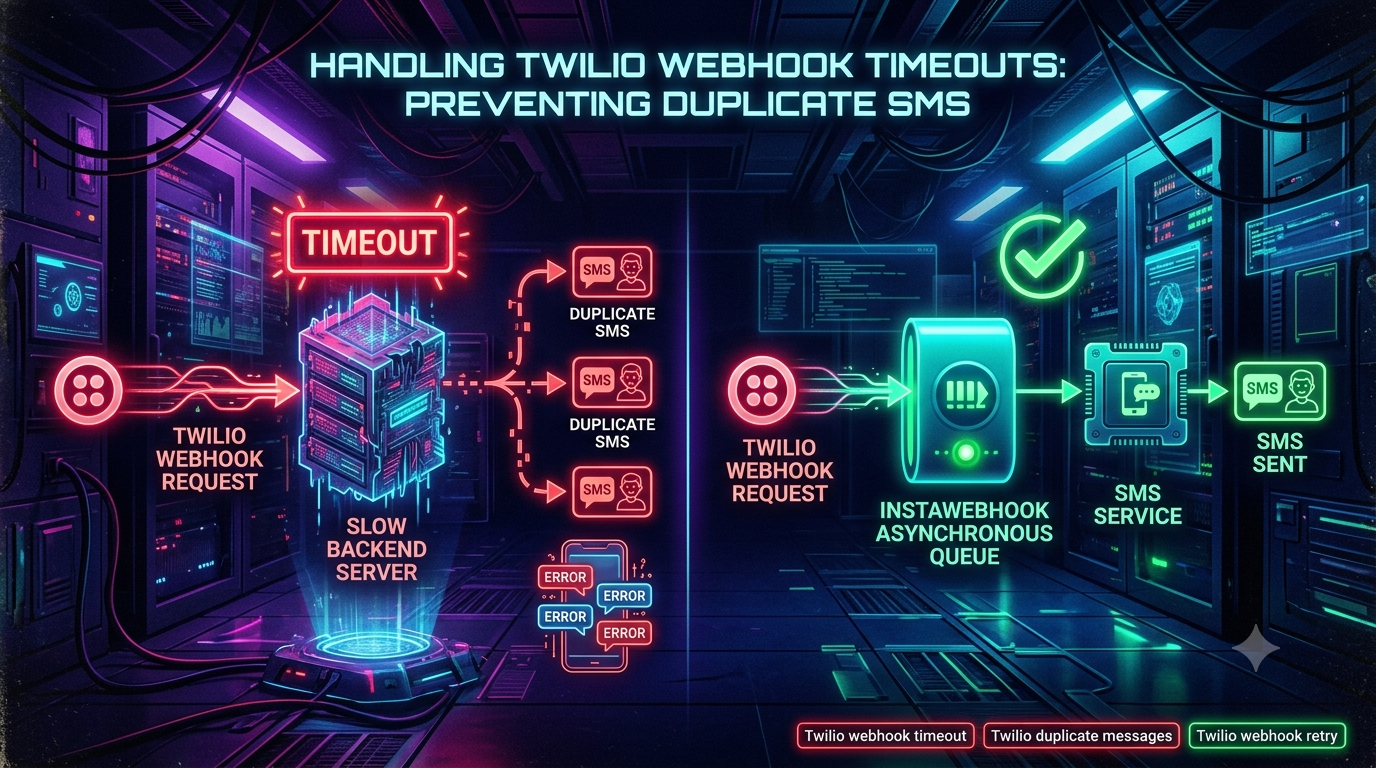
How to Fix Twilio Webhook Timeouts and Stop Duplicate SMS Messages
Picture this: a customer places an order and immediately gets three identical SMS confirmations at 2 a.m. They get annoyed, file a support ticket, and leave a bad review. Meanwhile finance notices a spike in the Twilio bill, and engineering is chasing a "phantom bug" that only shows up during peak traffic.
If that sounds familiar, the culprit is almost always the same: a Twilio webhook timeout that triggers a second (or third) attempt at the same logic, and a backend that isn't built to handle it.
This guide walks through why Twilio webhook timeouts happen, what Twilio's documentation actually says about retries (which is narrower than most blog posts claim), how a synchronous backend turns a timeout into duplicate texts, and how to build a handler that's immune to it.
1. What Is a Twilio Webhook Timeout?
When someone texts your Twilio number, Twilio is the HTTP client — it sends a request to the webhook URL configured on your phone number or Messaging Service, and your server is the one expected to answer, typically with a TwiML response.
+---------+                 +-------------------+
|         | -- HTTP POST -> |                   |
| Twilio  |    (Webhook)    |  Your Backend     |
| Server  |                 |  Application      |
|         | <- HTTP 200 --- |                   |
+---------+    (TwiML)      +-------------------+
For an incoming message, Twilio expects a valid TwiML response — even an empty <Response></Response> is enough if you don't want to reply immediately. For status callbacks (delivery receipts, etc.), Twilio only needs a 2xx status code; no TwiML required.
The actual timeout numbers
Twilio's own Webhooks: Connection Overrides documentation lays out the real default timing for HTTP callbacks:
| Setting | Default | Range | Meaning |
|---|---|---|---|
| Connect timeout | 5,000 ms | 100–10,000 ms | Time Twilio waits to establish the TCP/TLS connection |
| Read timeout | 15,000 ms | 100–15,000 ms | Time Twilio waits for your response after the connection is open |
| Total time (all retries) | 15,000 ms | 100–15,000 ms | Overall budget including retries |
| Retry count | 1 | 0–5 | Number of retry attempts |
| Retry policy | ct only | 4xx, 5xx, ct, rt, all | Which failure types trigger a retry |
A few things worth calling out that many articles get wrong:
- The hard 15-second ceiling is explicitly a voice/call requirement. Twilio's docs state that "due to the real-time nature of voice calls, there is a hard upper timeout of 15 seconds imposed on all call-related HTTP requests." For messaging and other product webhooks, 15 seconds is the default read timeout, not an immovable law — Twilio lets you extend or shrink it (down to 100 ms, up to 15,000 ms) by appending a connection-override fragment to your webhook URL, e.g.
https://example.com/sms-webhook#rt=5000. - Twilio Conversations webhooks are capped much lower — 5 seconds — with no override available for that product.
- The override fragments (
ct,rt,tt,rc,rp,e,sni) are parsed by Twilio's own systems before the request goes out; they never travel over the wire to your server and are excluded from theX-Twilio-Signaturecalculation.
When your server fails to respond within the applicable window, Twilio's Debugger logs one of two closely related errors:
- Error 11200 – HTTP retrieval failure: a non-2xx status code, a connection failure, or a response Twilio couldn't parse.
- Error 11205 – HTTP connection timeout: your server didn't return a response inside the configured read-timeout window.
Practical guidance: aim to acknowledge Twilio in well under a second — 100–500 ms is a commonly cited target across production guides — and treat anything past 2–3 seconds as a risk zone, since that's where cold starts, connection-pool contention, or a slow downstream call can tip you over the edge.
2. How Twilio's Retries Actually Work (and where duplicate sends really come from)
This is the part most "fix your duplicate SMS" articles get wrong, so it's worth being precise.
Looking at the table above: the default retry policy is ct, meaning Twilio's out-of-the-box behavior only retries when the connection itself fails to establish (a TCP or TLS handshake failure) — not when your server accepts the connection but is simply slow to respond (a read timeout), and not on a 5xx response. To get Twilio to automatically retry on a read timeout or a 5xx, you have to explicitly opt in with a connection-override fragment like #rp=rt,5xx or #rp=all, and you can raise the retry count up to 5.
This matters because it changes where you should actually be looking for the source of duplicate messages:
- Your own application-level retry or polling logic. Many "resilient" integrations that poll Twilio's REST API, resubmit failed jobs from a queue, or manually resend from the Twilio Console are the real second trigger — not a Twilio-initiated retry.
- A configured Fallback URL. For incoming message and call webhooks, a failure on the primary URL causes Twilio to try the Fallback URL you set on the phone number or TwiML application — a second, independent invocation of your logic, potentially hitting a different endpoint that does the same thing.
- A background job that finishes regardless of what Twilio does. This is the scenario the original version of this article focused on, and it's real: if your handler kicks off a background task (e.g., pushes to a queue, or just keeps running after the HTTP response times out) and that task sends the outbound SMS via the REST API, the send happens independent of whether Twilio ever "gave up" on the HTTP connection. If any mechanism — a retry, a fallback, a cron-based reconciliation job — re-triggers that same background task for the same inbound event, you get two sends.
- You explicitly opted into retries with a connection override and didn't build for it.
A genuinely useful fact most guides miss: Twilio adds an I-Twilio-Idempotency-Token HTTP header to webhook requests, which stays consistent across genuine Twilio-initiated retry attempts for the same underlying event. It's a second signal you can check alongside MessageSid/SmsSid — though for incoming-message webhooks, deduplicating on MessageSid alone is still the simplest and most broadly effective approach, since it also protects you against the fallback-URL and background-job scenarios above, which the idempotency token doesn't cover.
3. The Synchronous Pipeline Race Condition
Whatever the actual trigger — Twilio retry, fallback URL, or your own queue reprocessing a stuck job — the underlying architectural flaw is the same: a synchronous handler that does slow work in the request path, combined with no protection against the same event being processed twice.
[Timeline of a Duplicate SMS Failure]

Time = 0s  : Event #1 arrives -> Your server receives payload.
Time = 1s  : Server starts slow work (DB query, LLM API call, CRM lookup).
Time = 15s : HTTP connection TIMES OUT (Error 11205).
             --> Logged as a failed delivery for Event #1.
Time = 16s : A second delivery of the same event arrives
             (fallback URL, retry, or reprocessed queue job).
Time = 18s : Event #1's background work FINALLY finishes.
             --> Server calls the Twilio REST API to send SMS #1.
Time = 32s : Event #2's background work FINALLY finishes.
             --> Server calls the Twilio REST API to send SMS #2.
Neither execution was cancelled. Both ran to completion. Both called messages.create(). The customer gets two texts.
4. Why Webhook Handlers Take More Than a Few Hundred Milliseconds
Nobody sets out to build a slow handler. It usually happens because a genuinely slow, synchronous call gets placed directly in the request path.
| Cause | Description | Typical latency |
|---|---|---|
| Generative AI / LLM calls | Calling OpenAI, Anthropic, or a custom model synchronously to generate a reply | 1–20+ s |
| Third-party CRM / API calls | Querying Salesforce, HubSpot, or Zendesk before responding | 1–8 s |
| Database locks & slow queries | Heavy writes, unindexed lookups, or connection-pool exhaustion under load | 0.5–15+ s |
| Outbound media fetching | Downloading and processing high-resolution MMS attachments | 2–10 s |
| Cascading downstream failures | One internal microservice hanging, blocking the request thread | Variable |
Traffic spikes (flash sales, marketing blasts) make this worse: a handler that normally takes 200 ms can balloon past several seconds once thread pools and DB connection pools are saturated.
5. The Business Costs of Getting This Wrong
- Wasted spend. Every outbound SMS costs money; duplicate sends inflate your bill directly.
- Carrier filtering risk. US mobile carriers monitor for bursty, repetitive traffic from the same sender, which can degrade deliverability or draw scrutiny under A2P 10DLC campaign vetting — this is a longstanding, well-established part of how carriers police SMS traffic, not a new development.
- Trust and opt-outs. Recipients who get spammed with duplicates are far more likely to reply STOP, permanently opting out of your messaging.
- Thundering-herd server load. A retry or fallback delivery doubles the incoming request volume to an already-struggling server at exactly the worst moment.
6. Anti-Pattern vs. Best Practice
Anti-pattern: the synchronous monolith
[BAD PRACTICE: SYNCHRONOUS HANDLER]

Client (Twilio)
   |
   |--- HTTP POST (Webhook) ---> [ Your Web Server ]
   |                                   |
   |                                   |---> 1. Validate Request Signature
   |                                   |---> 2. Fetch User from DB (200ms)
   |                                   |---> 3. Call AI API for response (14,000ms)
   |                                   |---> 4. Write Log to DB (300ms)
   | <--- HTTP 200 OK (TIMED OUT!) <----| Total Time: 14.5s+
Best practice: asynchronous decoupling
Your webhook endpoint does the minimum: validate the request, enqueue the payload, and return a 2xx (with an empty <Response/> for TwiML endpoints) in well under a second. A separate worker pool does the actual work.
[BEST PRACTICE: ASYNCHRONOUS QUEUE]

Client (Twilio)
   |
   |--- HTTP POST (Webhook) ---> [ Fast Webhook Ingestion Endpoint ]
   |                                   |
   | <--- HTTP 200 OK (< 50ms) --------| (Ingestion returns immediately)
                                       |
                                       v
                             [ Durable Message Queue ]
                                       |
                                       v
                            [ Background Worker Pool ]
                                       |
                                       |---> 1. Fetch User from DB
                                       |---> 2. Call AI API
                                       |---> 3. Send SMS via Twilio REST API
7. Build vs. Buy: Your Queueing Options
Standing up your own queue (Redis + BullMQ, AWS SQS, RabbitMQ) is the classic DIY route — it gives you full control but adds infrastructure you have to run, monitor, and patch.
If you'd rather not manage that infrastructure, there's a category of managed webhook gateway/buffer products that sit between Twilio and your app: they acknowledge Twilio instantly, queue the payload durably, throttle delivery to match your backend's real capacity, retry your own endpoint if it's temporarily down, and give you a UI to inspect and replay individual webhook payloads. Providers in this space include Hookdeck, InstaWebhook, and similar webhook-infrastructure vendors — worth evaluating against each other and against a self-hosted queue based on your volume, budget, and how much ops overhead you want to own. None of these products change Twilio's own retry behavior described in Section 2; they just protect you from your own downstream slowness and give you a safety net if your worker fleet goes down entirely.
Whichever route you pick, the pattern is the same: acknowledge fast, process separately.
8. Idempotency: Your Second, More Important Line of Defense
Even with perfect async architecture, duplicate deliveries can still happen (fallback URLs, network retries at various layers, manual resends from the Console, at-least-once delivery semantics in your own queue). The only way to be fully protected is to make processing idempotent.
An operation is idempotent if doing it multiple times produces the same result as doing it once: "No matter how many times I receive an event tied to MessageSid SM12345, I only send one outgoing SMS in response."
Using MessageSid as the idempotency key
Every incoming Twilio webhook includes a MessageSid (or SmsSid) that uniquely identifies that message event. Use Redis or your primary datastore to lock and track processed IDs:
- Webhook payload arrives with
MessageSid: "SMxxxxxxxxxxxxxxxxxxxxxxxxxxxxxxxx". - Atomically check-and-set a key like
twilio:processed:SMxxxxxxxx. - If the key already existed: this is a duplicate delivery. Log it and stop — don't send anything.
- If the key didn't exist: you just claimed it. Set a TTL of roughly 24–48 hours and proceed with your business logic.
Use an atomic SET ... NX (or your database's equivalent conditional insert) rather than a plain "check, then set" — a naive check-then-set has its own race condition when two deliveries arrive within milliseconds of each other.
9. Code Walkthrough: A Bulletproof Webhook Handler
❌ Vulnerable: synchronous processing inside the HTTP request loop
// BAD PRACTICE: Synchronous processing inside the HTTP request loop
const express = require('express');
const { MessagingResponse } = require('twilio').twiml;
const openai = require('./openaiClient'); // Hypothetical slow AI client
const app = express();

app.use(express.urlencoded({ extended: false }));

app.post('/sms-webhook', async (req, res) => {
  const { Body, From } = req.body;

  try {
    // DANGER: heavy AI processing inside the synchronous HTTP thread.
    // If this takes too long, Twilio's read timeout fires (Error 11205),
    // and any fallback URL or retry you've configured can trigger a
    // second, independent execution of this same handler.
    const aiResponse = await openai.generateReply(Body);

    const twiml = new MessagingResponse();
    twiml.message(aiResponse);

    res.type('text/xml').send(twiml.toString());
  } catch (error) {
    console.error('Processing failed:', error);
    res.status(500).send('Internal Server Error');
  }
});

app.listen(3000, () => console.log('Server running on port 3000'));
✅ Production-ready: async queue + idempotency
Step 1 — Fast ingestion endpoint (server.js)
const express = require('express');
const Redis = require('ioredis');
const { Queue } = require('bullmq');
const twilio = require('twilio');

const app = express();
const redis = new Redis(process.env.REDIS_URL);
const smsQueue = new Queue('sms-processing-queue', { connection: redis });

app.use(express.urlencoded({ extended: false }));

app.post('/sms-webhook', async (req, res) => {
  const { MessageSid, From, Body } = req.body;

  try {
    // 1. VERIFY the request actually came from Twilio before doing anything else.
    const signature = req.headers['x-twilio-signature'];
    const url = `https://${req.headers.host}${req.originalUrl}`;
    if (!twilio.validateRequest(process.env.TWILIO_AUTH_TOKEN, signature, url, req.body)) {
      return res.status(403).send('Invalid signature');
    }

    // 2. IDEMPOTENCY CHECK: atomic check-and-set, not check-then-set.
    const lockKey = `twilio:lock:${MessageSid}`;
    const claimed = await redis.set(lockKey, 'LOCKED', 'NX', 'EX', 86400); // 24h TTL

    if (!claimed) {
      console.warn(`[DUPLICATE] Ignored repeat delivery for MessageSid: ${MessageSid}`);
      return res.type('text/xml').send('<Response></Response>');
    }

    // 3. OFFLOAD to the queue — no slow work happens on this thread.
    await smsQueue.add('process-incoming-sms', {
      messageSid: MessageSid,
      from: From,
      body: Body,
      receivedAt: Date.now()
    });

    // 4. RESPOND immediately.
    res.type('text/xml').send('<Response></Response>');

  } catch (error) {
    console.error('Webhook ingestion error:', error);
    // Still return 2xx where safe, so a genuine Twilio retry
    // isn't triggered by a transient error on your side.
    res.type('text/xml').send('<Response></Response>');
  }
});

app.listen(3000, () => console.log('Fast webhook ingest server running on port 3000'));
Step 2 — Background worker (worker.js)
const { Worker } = require('bullmq');
const Redis = require('ioredis');
const twilio = require('twilio');
const openai = require('./openaiClient');

const redis = new Redis(process.env.REDIS_URL);
const twilioClient = twilio(process.env.TWILIO_ACCOUNT_SID, process.env.TWILIO_AUTH_TOKEN);

const worker = new Worker('sms-processing-queue', async (job) => {
  const { from, body, messageSid } = job.data;

  console.log(`[WORKER] Processing message ${messageSid} from ${from}...`);

  const aiReply = await openai.generateReply(body);

  await twilioClient.messages.create({
    to: from,
    from: process.env.TWILIO_PHONE_NUMBER,
    body: aiReply
  });

  console.log(`[WORKER] Sent reply to ${from} for MessageSid: ${messageSid}`);
}, { connection: redis });

worker.on('failed', (job, err) => {
  console.error(`[WORKER ERROR] Job ${job.id} failed: ${err.message}`);
});
10. Testing and Monitoring
Watch the Twilio Debugger
Check Twilio Console → Monitor → Logs → Errors regularly for:
- Error 11200 — HTTP retrieval failure
- Error 11205 — HTTP connection timeout
A sustained drop toward zero of these two errors is a good signal your ingestion path is healthy.
Load-test your endpoint before Twilio does it for you
Use a tool like k6, Locust, or Postman to simulate concurrent webhook bursts against staging:
import http from 'k6/http';
import { check } from 'k6';

export const options = {
  vus: 50,
  duration: '30s',
};

export default function () {
  const url = 'https://your-staging-server.com/sms-webhook';
  const payload = {
    MessageSid: `SMtest_${Math.random()}`,
    From: '+15551234567',
    Body: 'Testing webhook performance under load',
  };

  const params = {
    headers: { 'Content-Type': 'application/x-www-form-urlencoded' },
  };

  const res = http.post(url, payload, params);

  check(res, {
    'is status 200': (r) => r.status === 200,
    'response time < 200ms': (r) => r.timings.duration < 200,
  });
}
Also test the failure paths deliberately: send the same MessageSid twice in a row and confirm only one outbound SMS fires; kill your worker mid-job and confirm the queue redelivers without double-sending once it comes back.
11. Summary Checklist
- Respond fast. Target 100–500 ms; treat anything over 2–3 seconds as a risk zone, and never do LLM calls, CRM lookups, or heavy DB writes synchronously in the handler.
- Understand Twilio's real retry defaults. Out of the box, Twilio retries only on connection-establishment failure (
ct), once. If you want automatic retries on timeouts or 5xx, opt in explicitly via connection-override fragments (rp=rt,rp=5xx, orrp=all) — and build your idempotency layer either way. - Check your Fallback URL configuration. It's a second, independent code path that can double-process the same event.
- Use an async queue. Redis + BullMQ, AWS SQS, RabbitMQ, or a managed webhook gateway (Hookdeck, InstaWebhook, etc.) — offload everything past the acknowledgment.
- Enforce idempotency with an atomic check-and-set on
MessageSid, TTL 24–48 hours. Optionally cross-check theI-Twilio-Idempotency-Tokenheader for genuine Twilio-initiated retries. - Send outbound SMS via the REST API from your worker, not from synchronous TwiML.
- Always verify
X-Twilio-Signaturebefore trusting a webhook payload. - Monitor errors 11200 and 11205 in the Debugger to catch latency regressions early.
Decouple ingestion from processing, and make processing idempotent regardless of why a duplicate delivery might occur — that combination is what actually eliminates duplicate SMS sends, not any single fix in isolation.
Sources: Twilio Webhooks: Connection Overrides, Twilio Messaging Webhooks, Twilio Webhooks Overview, Twilio Conversations Webhooks, Twilio Error 11200.