Debugging Webhooks in Local Dev Environments: Intercepting, Replaying, and Mocking Downstream Failures
Learn how to inspect webhook delivery timelines, replay payloads locally without hitting upstream APIs, and mock rate limits or timeouts in local dev environments.
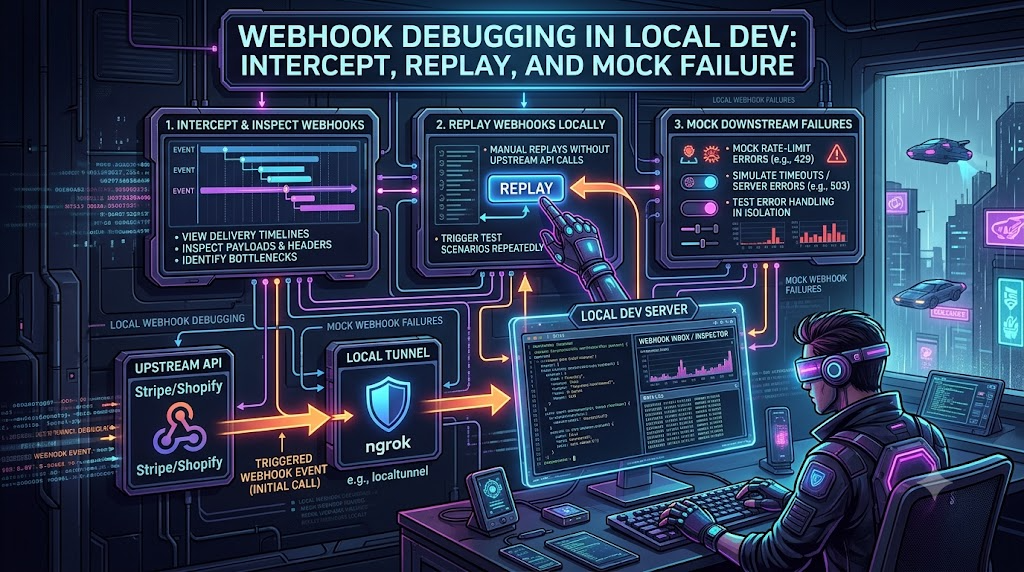
Debugging Webhooks in Local Dev Environments: Intercepting, Replaying, and Mocking Downstream Failures
Event-driven architectures lean heavily on webhooks to connect third-party platforms such as Stripe, Shopify, GitHub, and Twilio to internal backend services. Debugging them locally is still a common source of friction. Providers send HTTP callbacks over the public internet, so they cannot reach a server running on localhost:3000 or 127.0.0.1.
Closing that gap raises follow-up questions:
- How do you inspect the exact delivery payload and headers without touching production data?
- How do you replay a captured event locally without re-triggering the upstream action?
- How do you force your handler through failure paths such as slow downstream calls,
429 Too Many Requestsresponses,5xxerrors, and duplicate deliveries?
This guide covers how to receive webhooks locally, inspect deliveries, replay them, and simulate failures deterministically. Provider limits quoted below come from each provider's own documentation as of October 2026. They change, so check the current docs before you depend on a specific number.
1. The Local Webhook Debugging Architecture
In production, the provider sends an HTTPS POST to a public ingress route. Locally, you place a tunnel or proxy between the provider and your machine.
[ Upstream Provider ] (e.g., Stripe, Shopify, GitHub)
       │
       │ HTTP POST (event payload + signature headers)
       ▼
[ Public Endpoint / Tunnel / Webhook Gateway ] (e.g., ngrok, Hookdeck, Cloudflare Tunnel)
       │
       ├─► [ Inspection UI ] (headers, body, status, timing)
       │
       │ Forwarded request
       ▼
[ Local Dev Server ] (localhost:3000/api/webhooks)
       │
       └─► [ Mocked or faulty dependencies ] (simulated downstream failures)
Three Common Approaches
- Public tunnels. Tools such as ngrok and Cloudflare Tunnel give your local port a public HTTPS URL. ngrok also ships a local request inspector with a replay button (see Section 3). Shopify's CLI uses a Cloudflare tunnel by default when you run
shopify app dev, and the tunnel URL changes on every run, so a webhook subscription pointing at an old URL will stop working. - Provider CLIs. Tools such as the Stripe CLI listen to your account's events and forward them to a local endpoint, so no public URL is needed. The Shopify CLI can send a sample payload for a chosen topic to any address.
- Capture-and-replay gateways. Services such as Hookdeck sit between the provider and your machine. The Hookdeck CLI (
hookdeck listen <port> <source-name>) forwards events to your local server while the gateway keeps them, so you can retry any event on demand. If your local handler returns a non-2xx response, the event stays available for retry.
2. Inspecting Deliveries and Raw Payloads
When a webhook "does nothing", the cause is usually in the details: a signature mismatch, a re-serialized body, or a response that arrived too late. Check these first.
| What to inspect | What to look for | Typical failure |
|---|---|---|
| Response status | 2xx returned promptly | Handler throws (500), or the provider gives up waiting. |
| Raw request body | The exact bytes the provider sent | Middleware parsed and re-serialized the JSON, changing the bytes. |
| Signature headers | Stripe-Signature, X-Shopify-Hmac-SHA256, X-Hub-Signature-256 (GitHub) | Wrong secret, wrong body, or clock skew. |
| Response time | Time until your handler returns | Slow work done before responding. |
| Delivery IDs | X-Shopify-Webhook-Id, X-GitHub-Delivery, Stripe's event.id | Same ID arriving more than once (retry or redelivery). |
Know the Provider Limits
Timeout and retry behavior differs by provider, so test against the one you actually integrate with:
| Provider | Documented behavior |
|---|---|
| Shopify | Expects a response within about 5 seconds, with a 1-second connection timeout. On no response or an error, it retries 8 times over the next 4 hours. |
| Stripe | Tells you to return a 2xx before any complex logic that could cause a timeout. In live mode it retries for up to 3 days with exponential backoff. In a sandbox it retries 3 times over a few hours. Stripe does not publish a fixed response-time limit. |
| GitHub | Expects a 2xx within 10 seconds. GitHub does not automatically redeliver failed deliveries, but you can redeliver them manually or through the REST API. |
| Twilio | Connection timeouts and retries are configurable per webhook URL through connection overrides. For call-related requests there is a hard upper timeout of 15 seconds. |
Preserve the Raw Body for Signature Verification
A very common local bug is signature verification failing because a body parser such as express.json() ran first. Stripe signs the exact bytes it sent, so a re-serialized body no longer matches. The same applies to Shopify's HMAC, which is computed over the raw request body.
With Stripe's official Node library, use express.raw() on the webhook route only, and register that route before any global JSON parser:
import express from 'express';
import Stripe from 'stripe';

const stripe = new Stripe(process.env.STRIPE_SECRET_KEY);
const endpointSecret = process.env.STRIPE_WEBHOOK_SECRET; // whsec_...

const app = express();

// Raw body parser applies to this route only
app.post(
  '/api/webhooks',
  express.raw({ type: 'application/json' }),
  (req, res) => {
    const signature = req.headers['stripe-signature'];
    let event;

    try {
      // req.body is a Buffer here, which is what verification needs
      event = stripe.webhooks.constructEvent(req.body, signature, endpointSecret);
    } catch (err) {
      console.error(`Signature verification failed: ${err.message}`);
      return res.status(400).send(`Webhook Error: ${err.message}`);
    }

    // Acknowledge first, then do the real work in the background
    res.status(200).json({ received: true });
    processWebhookAsync(event).catch(console.error);
  }
);

// Register JSON parsing for the rest of the app after the webhook route
app.use(express.json());
Two details to remember when testing locally:
- Use the right signing secret. When you run
stripe listen, the CLI prints a webhook signing secret for that forwarding session. It differs from the secret of an endpoint registered in the Dashboard. - Mind the timestamp tolerance. Stripe's libraries reject signatures whose timestamp is more than five minutes from the current time by default. Large clock drift on your machine makes every verification fail, and so does replaying an old captured Stripe request (see Section 3).
3. Replaying Webhooks Locally Without Upstream Triggers
Generating a real event, such as completing a test checkout, is slow and hard to repeat. Replaying a captured event is faster and deterministic.
Method 1: Replay from the ngrok Inspector
- Start a tunnel:
ngrok http 3000
- Open the agent's web inspection interface at
http://127.0.0.1:4040(orhttp://localhost:4040). - Select a captured webhook request.
- Click Replay in the top-right corner of the request to resend it to your local server. Use the dropdown on the Replay button to Replay with modifications, which lets you edit the method, path, headers, trailers, and body first.
ngrok also offers a cloud-based Traffic Inspector in its dashboard, which adds longer retention and search. Its replay feature works only for fully captured, non-truncated requests, and it adds an Ngrok-Replay-Original-Request-ID header to the replayed request.
Signature caveat: a replay resends the original request, including its original signature headers. Shopify's HMAC has no timestamp, so a replay still verifies. A Stripe replay older than the tolerance window will fail timestamp validation. When replaying older Stripe events, either use the Stripe CLI (below) or temporarily widen the tolerance in your development configuration only.
Method 2: Use the Provider's CLI
Stripe CLI. Forward events to your local endpoint and trigger test events on demand:
# Terminal 1: forward events and print the signing secret for this session
stripe listen --forward-to localhost:3000/api/webhooks

# Terminal 2: create a test event
stripe trigger payment_intent.succeeded
You can also run stripe listen --load-from-webhooks-api --forward-to localhost:4242/webhook to forward to your local server using the configuration of the endpoints you've registered. To re-send an event that already exists, use stripe events resend <event_id> --webhook-endpoint=<endpoint_id>. Stripe's documentation says manual retries from the CLI work for events up to 30 days old, and retries from the Dashboard work for up to 15 days.
Shopify CLI. shopify app webhook trigger sends a sample payload for an Admin API topic to an address you choose. Shopify says to use it for experimentation, initial configuration checks, and unit testing, and to verify the real end-to-end flow by performing the related action in Shopify. For local HTTP testing, use an address like http://localhost:{port}/{path}. If you target an ngrok URL, leave the local port out of it:
shopify app webhook trigger \
  --topic=orders/create \
  --address=http://localhost:3000/webhooks \
  --delivery-method=http
Samples produced this way are not real store events, and in the Shopify Remix app template the admin object is undefined for CLI-triggered webhooks.
GitHub. In a repository, organization, or app webhook's settings you can inspect recent deliveries and redeliver them. Because GitHub doesn't redeliver automatically, redelivery is also your recovery tool after your local server was down.
Hookdeck CLI. Run hookdeck listen 3000 <source-name> to forward events to your local server. In the CLI's interactive view, press r to retry the selected event, or use Retry in the Hookdeck dashboard.
Method 3: Replay a Saved Payload with cURL
For offline work or fully scripted tests, save a captured body and its headers to disk and replay them yourself:
curl -X POST http://localhost:3000/api/webhooks \
  -H "Content-Type: application/json" \
  -H "X-Shopify-Topic: orders/create" \
  -H "X-Shopify-Hmac-SHA256: <valid_hmac_for_this_exact_body>" \
  --data-binary @payloads/order_created_sample.json
Use --data-binary rather than --data so the file's bytes are sent unchanged. Newline handling in --data can alter the body and break HMAC verification. If the HMAC isn't valid for the saved body, your handler should reject the request, so either regenerate the signature with your app's secret or enable a dev-only verification bypass.
4. Mocking Downstream Failures: Timeouts, Rate Limits, and Duplicates
Making the happy path return 200 OK is only part of the job. Your handler also has to behave when something it depends on is slow, rate-limited, or down, and when the provider sends the same event more than once.
[ Inbound Webhook ] ──► [ Local Ingress Handler ]
                                  │
                 ┌────────────────┴────────────────┐
                 ▼                                 ▼
        [ Idempotency Guard ]            [ Processing Pipeline ]
        - duplicate event check          - queue / workers / database
        - skip already-processed         - calls to downstream APIs
                                                   │
                                                   ▼
                                       [ Fault Injection Layer ]
                                       - HTTP 429 with Retry-After
                                       - added latency / timeouts
                                       - 5xx errors, dropped connections
Scenario 1: Slow Handlers and Provider Timeouts
If your handler does heavy work before responding (image processing, email, multi-table writes), the provider may treat the delivery as failed and retry it. Shopify allows about 5 seconds, GitHub 10. The fix is to acknowledge quickly and process in the background:
app.post('/api/webhooks/orders', express.raw({ type: 'application/json' }), async (req, res) => {
  // ...verify the signature against req.body first...
  const event = JSON.parse(req.body.toString('utf8'));

  // Enqueue and return immediately
  await taskQueue.add('processWebhook', { eventId: event.id, payload: event });
  res.status(202).json({ status: 'queued', id: event.id });
});
To check that your system is correct when the worker is slow, inject an artificial delay on the processing side and confirm the HTTP response still returns quickly:
const sleep = (ms) => new Promise((resolve) => setTimeout(resolve, ms));

async function handleWebhookJob(job) {
  if (process.env.SIMULATE_SLOW_DOWNSTREAM === 'true') {
    await sleep(6000); // longer than Shopify's ~5 s limit, to prove the ack doesn't wait for it
  }
  await updateDatabase(job.data);
}
To test the opposite case, where the provider really does time out, temporarily make the handler wait longer than the limit before it responds. Then watch how the provider reports the failure and retries. With Stripe's sandbox this happens a few times over a few hours. With Shopify it follows its 8-retry schedule, and with GitHub it does not retry at all.
For network-level faults (added latency, dropped connections, hard timeouts) between your app and a dependency such as Redis or a database, Shopify's open-source Toxiproxy is a TCP proxy that can inject "latency" and "timeout" toxics, among others, and it has client libraries for several languages.
Scenario 2: Downstream 429 Too Many Requests
When a webhook makes your server call another API, bursts of webhooks can trigger rate limiting there. Use an HTTP interceptor such as Nock (or MSW) to return a 429 with a Retry-After header and confirm your code backs off:
import nock from 'nock';

nock('https://api.internal-service.com')
  .post('/v1/sync')
  .reply(
    429,
    { error: 'rate_limit_exceeded', message: 'Too many requests. Retry after 30 seconds.' },
    { 'Retry-After': '30' }
  );
Interceptors like this only affect requests made from the same Node process, so they suit integration tests. They won't affect a separate worker process. For those, run a small stub server that returns the failure and point the worker's base URL at it.
Then assert the behavior you want: the job is rescheduled using the Retry-After value rather than retried in a tight loop, and the webhook itself was already acknowledged.
Scenario 3: Duplicate Deliveries and Idempotency
Providers can deliver the same event more than once, so handlers must tolerate duplicates. Stripe notes that endpoints might occasionally receive the same event more than once, and Shopify says the same after a network timeout or retry. Shopify recommends the X-Shopify-Webhook-Id header for detecting duplicate deliveries. It also sends an X-Shopify-Event-Id header that stays the same across deliveries originating from the same merchant action, so you can use that one to correlate them. For Stripe, use event.id. For GitHub, use the X-GitHub-Delivery header.
Here is a Redis-based guard you can exercise locally. The first caller claims the event, duplicates are skipped, and a failure releases the claim so a retry can try again:
import Redis from 'ioredis';
const redis = new Redis();

const CLAIM_TTL_SECONDS = 24 * 60 * 60;

async function processIdempotentWebhook(eventId, payload) {
  const key = `webhook:event:${eventId}`;

  // SET ... NX returns 'OK' only if the key did not already exist
  const claimed = await redis.set(key, 'processing', 'EX', CLAIM_TTL_SECONDS, 'NX');

  if (claimed !== 'OK') {
    console.log(`[Idempotency] Duplicate event skipped: ${eventId}`);
    return { status: 'ignored', reason: 'duplicate_event' };
  }

  try {
    await executeOrderFulfillment(payload);
    await redis.set(key, 'completed', 'EX', CLAIM_TTL_SECONDS);
    return { status: 'success' };
  } catch (error) {
    // Release the claim so a later retry can reprocess the event
    await redis.del(key);
    throw error;
  }
}
Choose the retention period to cover the provider's retry window. Stripe retries for up to 3 days in live mode, so a 24-hour claim does not cover that window. In production, a durable database table with a unique constraint on the event ID is a safer record than a cache key alone.
Test it:
- Replay a webhook locally.
- Confirm the database was updated once and the log shows
success. - Replay the exact same request again, with the same event ID.
- Confirm the log shows
Duplicate event skippedand no second record exists. - Make
executeOrderFulfillmentthrow once, replay, and confirm the claim was released and the next replay succeeds.
Choose Your Error Responses Deliberately
What your endpoint returns controls what the provider does next. A non-2xx response, including a 400, generally causes Stripe and Shopify to retry the delivery. Return 2xx once you have safely accepted the event, even if downstream processing will happen later or may fail. Return a non-2xx code when you want the provider to try again. Reserve 4xx responses for requests you genuinely want rejected, such as failed signature verification. Handle invalid business payloads inside your own queue and dead-letter process instead of relying on the provider's retries.
5. Local Webhook Debugging Checklist
Signature verification
- The raw body reaches the verification code, and the webhook route is registered before any global JSON parser.
- The signing secret comes from an environment variable and matches the source of the events (for example, the secret printed by
stripe listen). - Your system clock is accurate. Stripe's default tolerance is five minutes.
Transport and delivery
- The tunnel or CLI is running, and the registered URL matches the current one (Shopify's CLI tunnel URL changes on each run).
- The handler responds well inside the shortest provider limit you support (about 5 seconds for Shopify, 10 seconds for GitHub).
- Heavy work runs in a background queue, not in the request handler.
Resilience and idempotency
- Duplicate deliveries are detected using the provider's delivery or event ID.
- Transient downstream failures (
429,502,503, timeouts) are retried with backoff inside your own job system. - You have tested a failed delivery and its retry or redelivery on each provider you rely on.
Conclusion
Local webhook debugging works best when you can reproduce a problem on demand. Capture real payloads and headers, verify signatures against the raw body, replay events through your tunnel, provider CLI, or a capture gateway, and inject slow, rate-limited, failing, and duplicate scenarios deliberately. Because each provider has its own timeout and retry rules, test against the specific limits of the platforms you integrate with, and confirm them in the provider's current documentation before relying on them.