Async AI Architecture: Handling AI Agent Webhook Callbacks & OpenAI Async Webhooks
Asynchronous Architectures: Handling Webhook Callbacks from AI Agents and LLMs The landscape of AI integration has shifted.
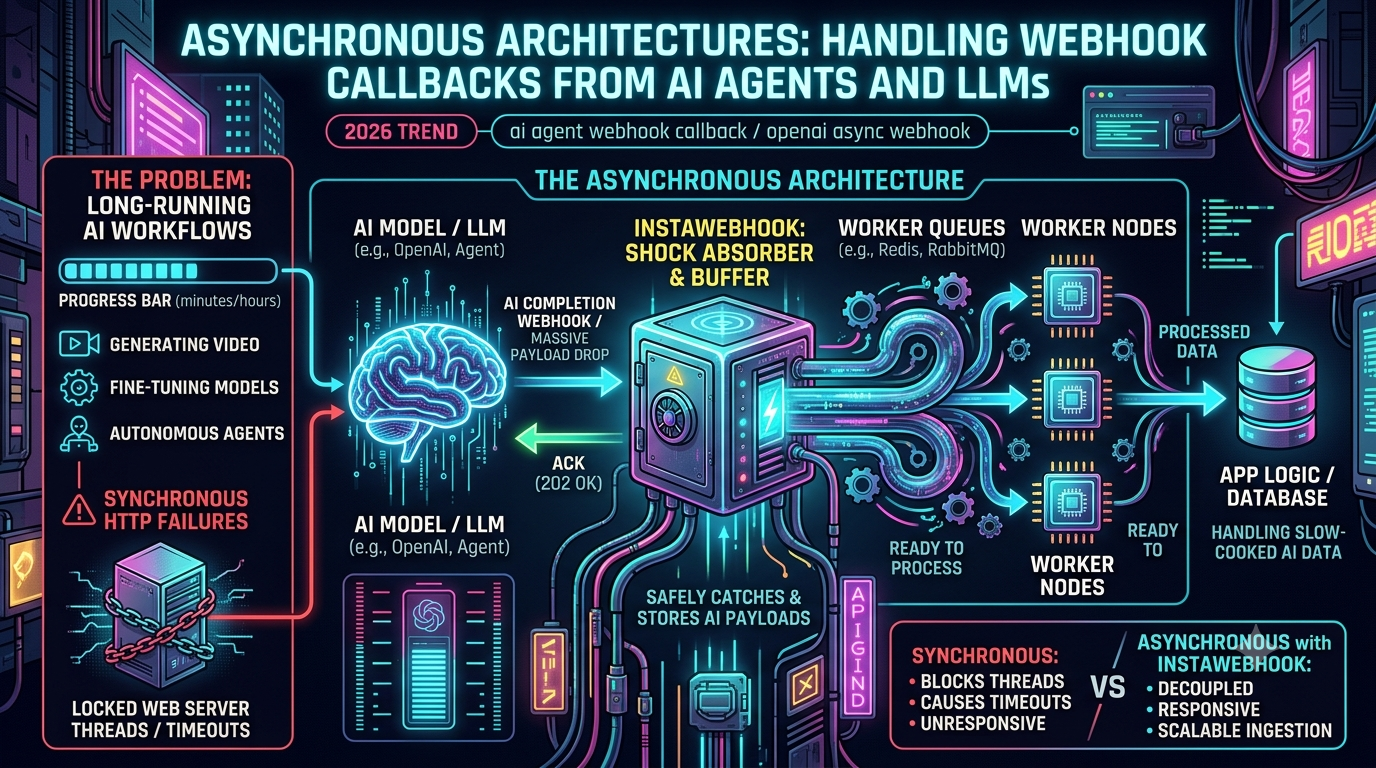
Asynchronous Architectures: Handling Webhook Callbacks from AI Agents and LLMs
The landscape of AI integration has shifted. A few years ago, calling an LLM meant sending a request and waiting a second or two for a chat completion. By 2026, the most valuable AI workflows — deep research, autonomous multi-agent tasks, video generation, and large batch jobs — are "slow-cooked." They don't take milliseconds; they take minutes, hours, or days.
Forcing these long-running jobs through a traditional synchronous HTTP request/response cycle is an architectural anti-pattern. You can't hold connections open indefinitely, block your event loop, or leave users staring at a spinner for twenty minutes. The answer is an asynchronous, event-driven architecture built around webhook callbacks: your application submits a job, frees its resources immediately, and lets the AI provider push the result back when it's ready.
This guide covers why synchronous HTTP breaks down for AI workloads, how OpenAI's webhook system actually works today, and how to architect a backend that can absorb large, unpredictable bursts of "slow-cooked" AI data without falling over.
1. Why Synchronous HTTP Breaks Down for AI Workloads
Traditional web architecture was built around fast operations — a cache hit in a few milliseconds, a database query in tens of milliseconds. Keeping a connection open for that long is cheap. An autonomous agent researching a topic, generating a video, or working through a batch of ten thousand prompts is a different order of magnitude entirely, and pushing that through a single held-open HTTP request runs straight into infrastructure limits that exist at every layer of the stack:
- Load balancers. AWS Application Load Balancers default to a 60-second idle timeout (configurable up to 4,000 seconds), and Network Load Balancers default to 350 seconds. Classic Load Balancers also default to 60 seconds, with a 3,600-second ceiling.
- Reverse proxies. NGINX's default
proxy_read_timeoutis 60 seconds, the same default used by HAProxy — a genuinely common failure point for anything that runs long. - CDNs. CloudFront's origin response timeout defaults to 30 seconds and caps at 60 seconds in the console; going beyond that requires an explicit AWS quota-increase request, up to a maximum of 600 seconds.
- Browsers and mobile clients. Idle connections are commonly dropped after 60–100 seconds of inactivity — Cloudflare, for instance, holds WebSocket connections open for 100 seconds by default on its Free and Pro plans.
Every one of these is a place where a long-running AI request can be silently killed, usually returning a 504 to the user while your backend keeps burning compute on a job nobody is listening for anymore. Even if you raise every timeout in the chain, you run into resource exhaustion instead: each open connection holds a worker thread and memory, so a burst of concurrent long-running requests can exhaust your connection pool and start rejecting even fast, unrelated requests like your homepage.
This is why the major AI providers — not just OpenAI, but Anthropic, Google, and others — have converged on webhook callbacks as the standard way to notify applications when long-running work finishes, rather than expecting a client to sit on a decade-old HTTP-1.1 connection.
2. How OpenAI's Webhook System Actually Works
OpenAI ships production webhook support today, and it's worth being precise about what it does and doesn't cover, because this is an area where a lot of blog content is out of date.
What triggers a webhook. OpenAI's webhooks fire for background Responses API calls (response.completed, response.cancelled, response.failed), Batch API jobs (batch.completed, batch.cancelled, batch.expired, batch.failed), fine-tuning jobs (fine_tuning.job.succeeded, fine_tuning.job.failed), eval runs (eval.run.succeeded, eval.run.canceled, eval.run.failed), and incoming Realtime API SIP calls (realtime.call.incoming). Standard synchronous endpoints like Chat Completions have no webhook equivalent — for those, streaming or polling is still the right tool.
The delivery mechanism. OpenAI's webhooks follow the Standard Webhooks specification, an open convention (stewarded by the webhook infrastructure company Svix) that has also been adopted by Anthropic, Google Gemini, Twilio, PagerDuty, and Supabase, among others — the goal being that verification and idempotency code you write for one provider mostly works for the next. Each delivery is an HTTP POST carrying three headers:
webhook-id— a unique identifier for the event, stable across retries, which is what makes it usable as an idempotency key.webhook-timestamp— a Unix timestamp of the delivery attempt. OpenAI's SDK helpers reject anything more than five minutes stale, which protects against replay attacks.webhook-signature— an HMAC signature (v1,<signature>) over the payload, verified against awhsec_-prefixed signing secret that's shown once, at endpoint creation, in the OpenAI dashboard.
A real payload looks like this:
{
  "object": "event",
  "id": "evt_685343a1381c819085d44c354e1b330e",
  "type": "batch.completed",
  "created_at": 1750287018,
  "data": {
    "id": "batch_abc123"
  }
}
Note that the payload is intentionally thin — it carries the resource ID, not the full result. This is a deliberate design choice: your handler makes a follow-up API call to fetch the current state of the resource, rather than trusting whatever data happened to be true at delivery time, which matters a lot on retries.
Retry behavior. If your endpoint doesn't return a 2xx status within a few seconds, OpenAI retries with exponential backoff for up to 72 hours. 3xx redirects are explicitly not followed and are treated as failures, so a URL that's been moved behind a redirect will just silently fail deliveries until you update the registered endpoint directly. OpenAI's own documentation is candid that, in rare cases due to internal system issues, duplicate deliveries of the same event can happen — which is why the webhook-id header exists as your deduplication key, not the event's id field alone.
3. Architecting Your App for "Slow-Cooked" AI Data
A POST /webhook endpoint sounds simple, but three rules separate a toy implementation from one that survives production traffic.
Rule 1: Acknowledge fast, process later
OpenAI expects a 2xx response within a few seconds. The common mistake is doing the real work — downloading a batch output file, running a secondary model over it, writing to a database — before returning that 200. If that takes ten seconds, OpenAI assumes the delivery failed, and resends the same (now enormous) payload a second time.
The correct shape is:
- Verify the
webhook-signature. - Push the raw payload into a background queue (SQS, RabbitMQ, Redis-backed BullMQ, Kafka — anything durable).
- Return
200 OKimmediately.
The actual work — hydrating the resource via the API, downloading files, writing to your database — happens in a worker process, fully decoupled from the HTTP response.
Rule 2: Verify every signature
Because a webhook endpoint has to be publicly reachable, it's also a target. Use the signing secret to verify the HMAC signature on every request before trusting the payload, and check the timestamp tolerance to guard against replay of a captured, legitimately-signed request. OpenAI's SDKs expose a single helper for this (client.webhooks.unwrap() in Python and Node) that handles both checks and throws on failure.
Rule 3: Make everything idempotent
At-least-once delivery is the norm across essentially every webhook provider — not a bug specific to OpenAI. Your database write for "mark this job complete" needs to be safe to run twice: track processed webhook-ids with a TTL that outlives the provider's full retry window (72 hours for OpenAI, so a day or two of margin is reasonable), and use upserts or unique constraints rather than blind inserts so a duplicate delivery is a no-op rather than a duplicate charge, email, or database row.
// Worker consuming from a durable queue
queue.process('ai-webhook-events', async (job) => {
  const event = job.data;

  // Idempotency check — keyed on webhook-id, not event.id
  const alreadyProcessed = await db.checkExists(event.webhookId);
  if (alreadyProcessed) return;

  if (event.type === 'batch.completed') {
    const results = await downloadBatchResults(event.data.id);
    await db.saveArticles(results);
    await db.markProcessed(event.webhookId);
    webSocketServer.sendToUser(event.userId, {
      message: 'Your batch is ready',
      jobId: event.data.id,
    });
  }
});
4. Absorbing the Thundering Herd: Where an Ingestion Layer Helps
Batch jobs don't complete one at a time — when a large job finishes, or a multi-agent swarm wraps up in parallel, you can go from zero webhook traffic to thousands of deliveries in a few seconds. If your web server takes that traffic directly, your database connection pool is the thing that gives way first.
This is the specific problem a dedicated webhook ingestion layer solves, and it's a real and growing category — Svix Ingest, Hookdeck Event Gateway, Convoy, and InstaWebhook all take the same basic approach: instead of pointing your AI provider's webhook config at your core application server, you point it at a purpose-built intake layer that sits in front of it.
Concretely, what a tool like InstaWebhook adds to the pipeline:
- Durable intake at the edge. Requests are accepted, validated, and queued for delivery before your application ever needs to be involved, so a slow or momentarily-down backend doesn't turn into a lost event or a retry storm against the provider.
- Signature verification at the boundary. Configured with your provider's signing secret, so malformed or unverified traffic never reaches your application code.
- A real queue between ingestion and processing. Traffic bursts get buffered and drained at a rate your workers can actually keep up with, instead of hitting your app all at once.
- Retry policies, replay, and dead-letter queues. If your own processing code has a bug, the raw event isn't lost — it sits in a dead-letter queue you can inspect and replay after you ship a fix, with delivery attempts, timestamps, and prior responses visible for debugging.
- Audit logs. A record of what was received, queued, attempted, retried, delivered, or dead-lettered, which is the difference between "we think this webhook fired" and being able to prove it.
The tradeoff is the one you'd expect with any managed layer: you're adding a hop and a dependency in exchange for not building and operating that infrastructure yourself. For a small volume of webhooks, a well-built endpoint with a queue behind it is often enough. Once you're dealing with genuinely bursty, high-volume AI callbacks — the kind a batch job or a multi-agent swarm produces — offloading ingestion to a layer built for exactly that pattern is a reasonable trade of a small amount of latency and a vendor dependency for a lot of engineering time not spent rebuilding retry, dedup, and replay logic from scratch.
5. The Full Flow, End to End
- Submission. A user triggers a job — say, generating a hundred articles. Your backend submits the prompts to the Batch API, gets back a batch ID, and stores it as
PENDING. The frontend subscribes to a WebSocket channel for updates and the user moves on. - Processing. For however long the job takes, your server does zero work related to it. No open connections, no idle threads.
- The callback. OpenAI fires
batch.completedto your registered endpoint (directly, or via an ingestion layer). The signature is verified, a200 OKis returned immediately, and the raw event lands in a queue. - The worker. A background worker (Celery, BullMQ, or similar) picks up the event, checks it hasn't been processed before, fetches the batch's output file by ID, and writes the results to your database.
- The notification. The worker pushes an update over the existing WebSocket connection, and the user's UI updates without ever having polled for it.
No connection was held open for four hours. No load balancer timed out. The burst of data was absorbed by a queue built to handle it.
6. Where This Pattern Shows Up in Practice
- Autonomous coding agents that open pull requests, write tests, and refactor code over 20–30 minutes, notifying a CI/CD pipeline via webhook when a human review is needed.
- Audio and video synthesis, where webhook delivery carries the storage URL of a finished render rather than the file itself.
- Overnight RAG re-indexing, where a scheduled batch embedding job fires a webhook once a new vector index is ready to swap into production.
- Customer support automation, where OpenAI's own guidance is explicit: use streaming when a person is actively waiting on a response, and use webhooks when the work can genuinely happen in the background — overnight ticket summarization, post-call report generation, and batch classification are the workloads webhooks are built for.
Conclusion
The move from fast, stateless completions to long-running, agentic AI work has changed what "normal" backend architecture looks like. Synchronous HTTP connections were never designed to survive a four-hour batch job, and every layer of standard web infrastructure — load balancers, proxies, CDNs, browsers — will eventually prove that to you the hard way.
Webhook callbacks, built on a shared open standard and backed by real retry and idempotency guarantees, are how AI providers have solved this. Your job on the receiving end is to acknowledge fast, verify everything, treat duplicates as normal, and put a queue — whether self-built or through a dedicated ingestion layer — between the provider's burst traffic and your application logic. Get that right, and the four-hour job is no different, operationally, than the one that took four seconds.